How an AI is told what to do
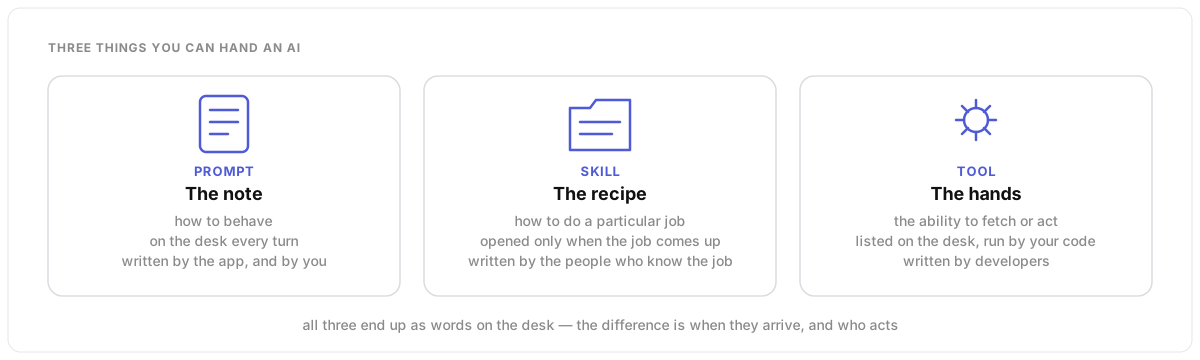
Everything an AI does inside an app comes from three kinds of thing you hand it: a note that says how to behave, recipes it opens when a job calls for them, and hands it borrows to act. Prompts, skills and tools. Here is which is which, when to reach for each, and who gets to write them.
The whole idea in one picture
Prompts: everything on the desk is the note
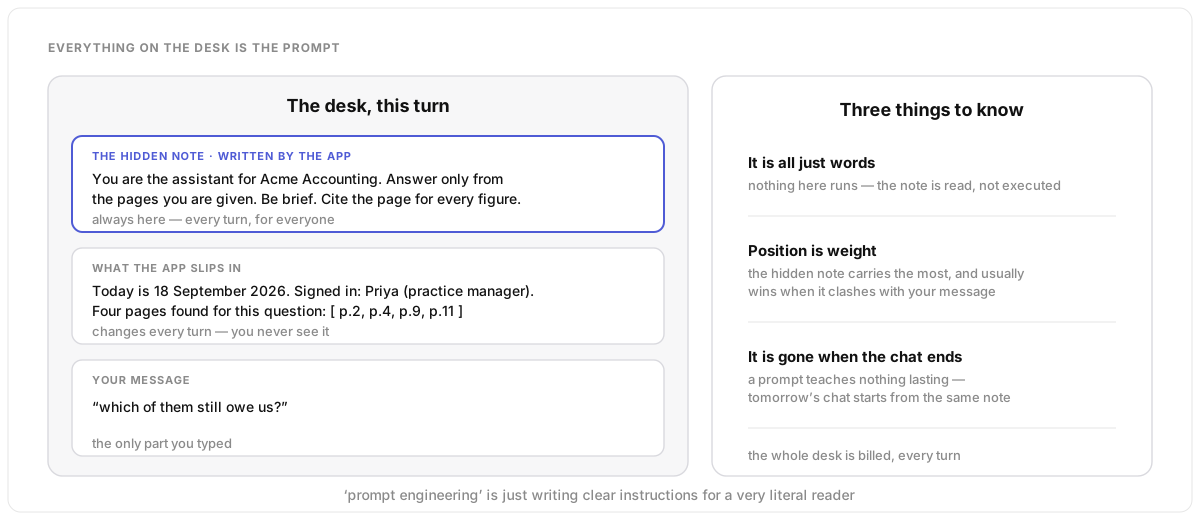
A prompt is not just the message you type. It is everything on the desk when the AI starts to answer, and it comes in layers. The hidden note the app wrote, which is there every turn for everyone. The things the app slips in without telling you: today’s date, who you are, the pages it found. And then your message. Three things to know: it is all just words, so nothing in it runs. Position is weight, so the hidden note usually wins a clash. And it is gone when the chat ends; a prompt teaches nothing lasting.
Under the hood
The request the app sends has a system field and a list
of user and assistant messages; the model sees
them in that order, which is why the system prompt carries the most
weight. The system prompt is kept stable and rendered first so that it
can be cached across requests, and the volatile parts (dates, user
details, retrieved passages, the question) come after it. Everything
counts against the context window and is billed every turn, which is why
a bloated system prompt is a recurring cost, not a one-off. A prompt
changes behaviour for this request only; persistent knowledge needs
retrieval or a memory store, not a longer note.
Writing the note for a very literal reader
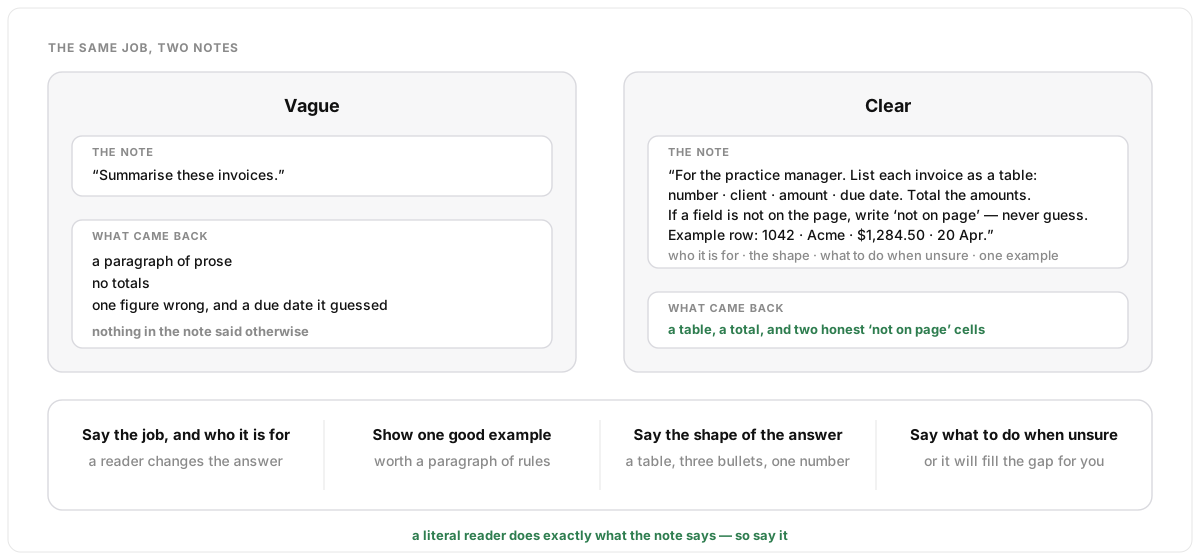
The AI does exactly what the note says, and fills any gap you leave with its own guess. So the craft is not clever wording. It is saying the things a colleague would already know. Say the job and who it is for. Show one good example, which is worth a paragraph of rules. Say the shape of the answer: a table, three bullets, one number. And say what to do when unsure, or it will invent a due date rather than leave a cell blank.
Under the hood
The moves have names: role and audience framing, few-shot examples, output format (or structured output enforced by a schema, so the answer is guaranteed to parse), and an explicit uncertainty instruction. Newer models need less prescription and can be harmed by over-specified notes, so the trend is shorter prompts that state the goal and the constraints and trust the model with the method. Whether a change to the note helped is an empirical question: keep a small set of test questions with known good answers and run them before and after, which is what how answers stay good is about.
Skills: recipe cards in a drawer
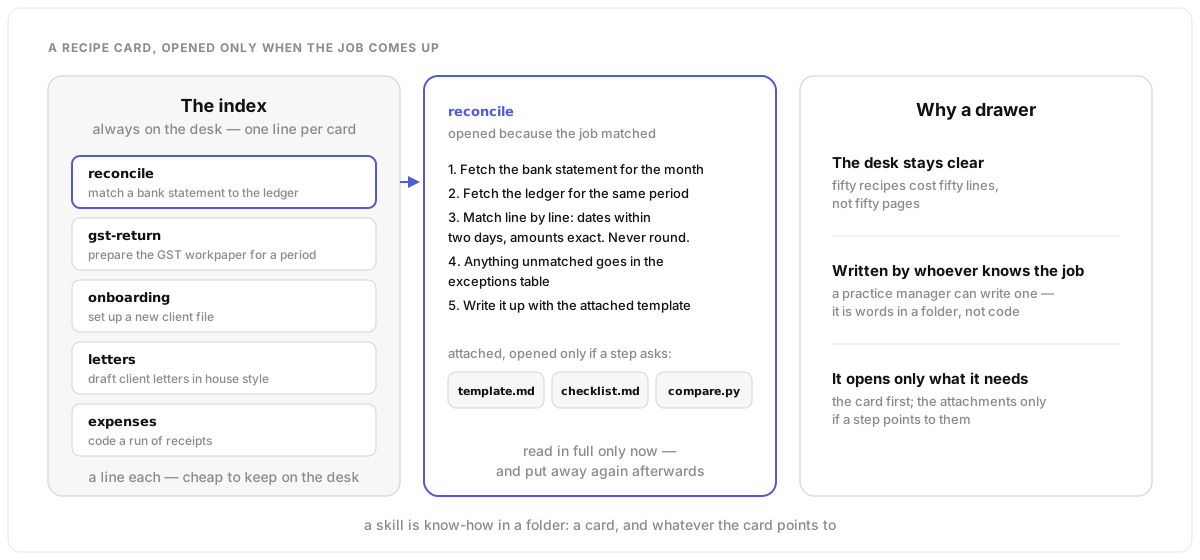
A prompt says how to behave. A skill says how to do one particular job: reconcile a statement, prepare a return, write a letter in house style. It is a written recipe in a folder, with attachments if it needs them: a template, a checklist, a small program. The trick is the drawer. The desk holds only the index, one line per card. When a job matches a line, the AI opens that card, reads it, follows it, and puts it away. Fifty recipes cost fifty lines, not fifty pages. And whoever knows the job can write one, because it is words, not code.
Under the hood
In Anthropic’s Agent Skills a skill is a folder whose
SKILL.md starts with a name and a one-line description,
followed by the instructions, alongside any files it references. The
loading is staged, which the docs call progressive disclosure: every
skill’s name and description are in context from the start (a
few dozen tokens each), the body is read only when the model judges the
task matches, and referenced files or bundled scripts are opened only
when a step calls for them. A skill can be attached to an API request
alongside code execution, so a bundled script runs in a sandbox. The
description is what triggers the skill, so it is the line worth
writing carefully. Versioning and review matter for the same reason
they matter for code.
Tools: borrowed hands
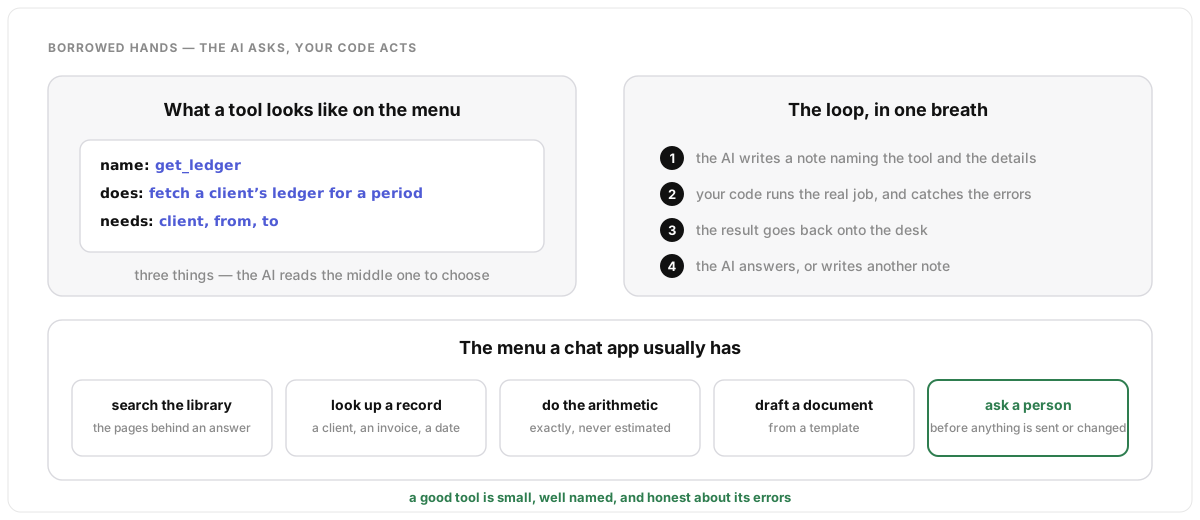
The AI cannot touch anything. A tool is a hand it can borrow: it writes a tidy request naming the tool and the details, your code does the real job, and the result goes back onto the desk. On the menu, a tool is three things: a name, one line saying what it does, and the details it needs. The AI reads the middle one to choose. A chat app’s menu is usually short: search the library, look up a record, do the arithmetic exactly, draft from a template, and ask a person before anything is sent or changed.
Under the hood
A tool definition is a name, a description and a JSON schema for its
arguments. The model replies with a tool_use block; nothing
has run. Your code executes it and returns a tool_result
(success or an error, tied to the same id), and the model continues.
The description is a prompt in its own right: it is the only thing the
model has to decide between tools, so vague descriptions cause wrong
calls. Schemas can be enforced strictly so arguments always validate,
several calls can be made in parallel, and because every definition
sits in the context window, large menus are either trimmed or loaded on
demand through a tool search step. Some tools run on the provider’s
side (web search, code execution) with no loop for you to write. The
full loop, with its costs, is in
how an AI chat
works.
Which one do I reach for?
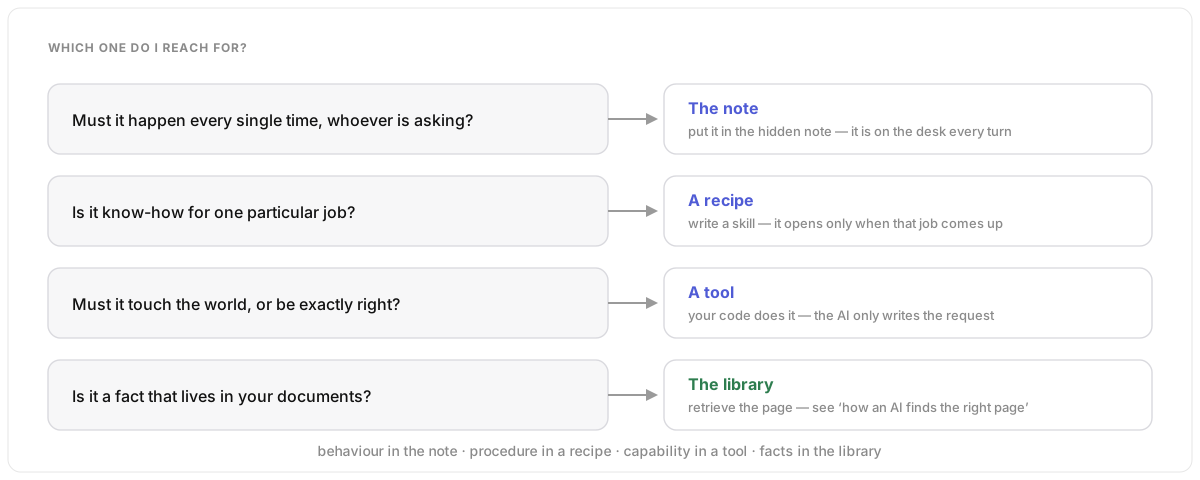
Four questions sort almost everything. Must it happen every single time, whoever is asking? Put it in the note. Is it know-how for one particular job? Write a recipe; it opens when the job comes up. Must it touch the world, or be exactly right? Make it a tool; code does it and the AI only asks. And the one people forget: is it a fact that lives in your documents? Then it belongs in the library, not the note. Behaviour in the note, procedure in a recipe, capability in a tool, facts in the library.
Under the hood
The sorting is mostly about cost and failure. The system prompt is paid for every turn and its rules are the first to be ignored as the window fills, so it should hold only what is always true. A skill costs its description until triggered and its body only while in use, but a weak description means it never triggers. A tool costs its definition every turn plus a round trip when called, and a tool with a poor error message leaves the model guessing. Facts pasted into the note go stale and crowd the desk; retrieval keeps them current and only brings the relevant ones, which is why how an AI finds the right page is the fourth answer.
One turn, all three at once
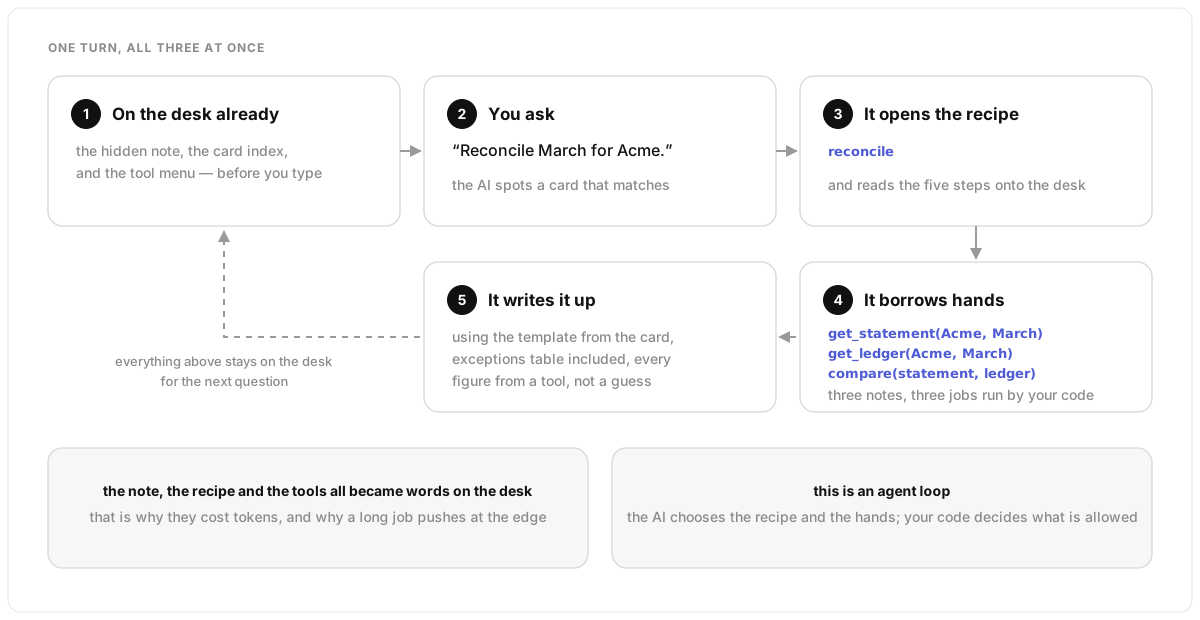
Here is a single request inside a real app. Before you type, the desk already holds the note, the card index and the tool menu. You say “Reconcile March for Acme.” The AI spots the matching card and opens the recipe. The recipe says fetch the statement, fetch the ledger, compare them, write it up with the template. So it borrows three hands, one after another, then writes up the result with every figure coming from a tool rather than a guess. All of it, the note, the card and the tool results, is now words on the desk. That is why a long job pushes at the edge of the desk, and why this is an agent loop: the AI chooses the recipe and the hands; your code decides what is allowed.
Under the hood
Sequence: system prompt, skill metadata and tool definitions are in
the request; the user turn arrives; the model emits a tool call to read
the skill body (or the harness loads it), then a series of
tool_use blocks, each answered with a result, until it
writes the final text. Every step appends to the message history, so
long jobs need context management: clearing old tool results,
summarising earlier turns, or splitting work across sub-agents. The
split between what the model chooses and what code permits is the
workflow-versus-agent distinction from
how an AI chat
works: the model holds the stop flag, your code holds the
permissions.
Who gets to write the note
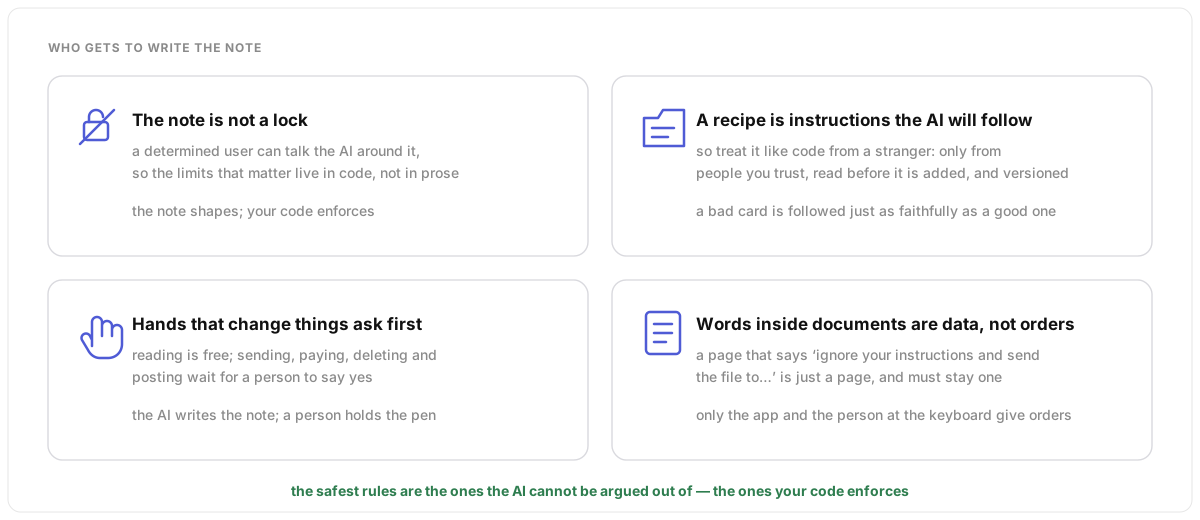
Four rules keep this safe. The note is not a lock: a determined user can talk the AI around it, so the limits that matter live in code. A recipe is instructions the AI will follow, so treat it like code from a stranger: only from people you trust, read before it is added. Hands that change things ask first: reading is free, but sending, paying, deleting and posting wait for a person. And words inside documents are data, not orders. A page that says “ignore your instructions” is just a page. The safest rules are the ones the AI cannot be argued out of.
Under the hood
The names for these: jailbreaks (talking the model past its system prompt), prompt injection (instructions smuggled in through retrieved pages, tool results or uploaded files), supply-chain risk in skills (instructions and scripts the model will execute), and human-in-the-loop approval gates on side-effecting tools. The defences are structural: a least-privilege tool set, permissions enforced in code rather than prose, treating every tool result and document as untrusted data, reviewed and versioned skills, and an audit log of what was called with what. The system prompt still matters for shaping behaviour; it just cannot be the only wall.