How an AI chat really works
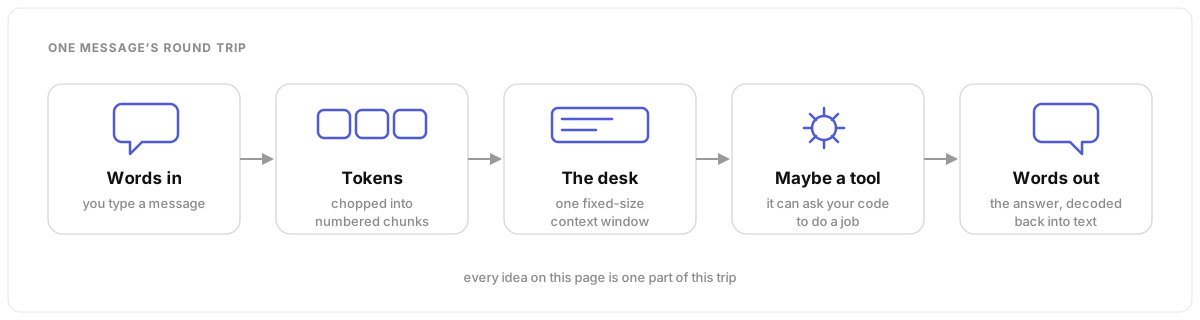
Five ideas explain almost everything: messages, tokens, the context window, tools, and agents. Learn these and the AI stops being magic. It becomes a strange but powerful tool that works best when you know its limits.
The whole trip in one picture
Messages, and the hidden note
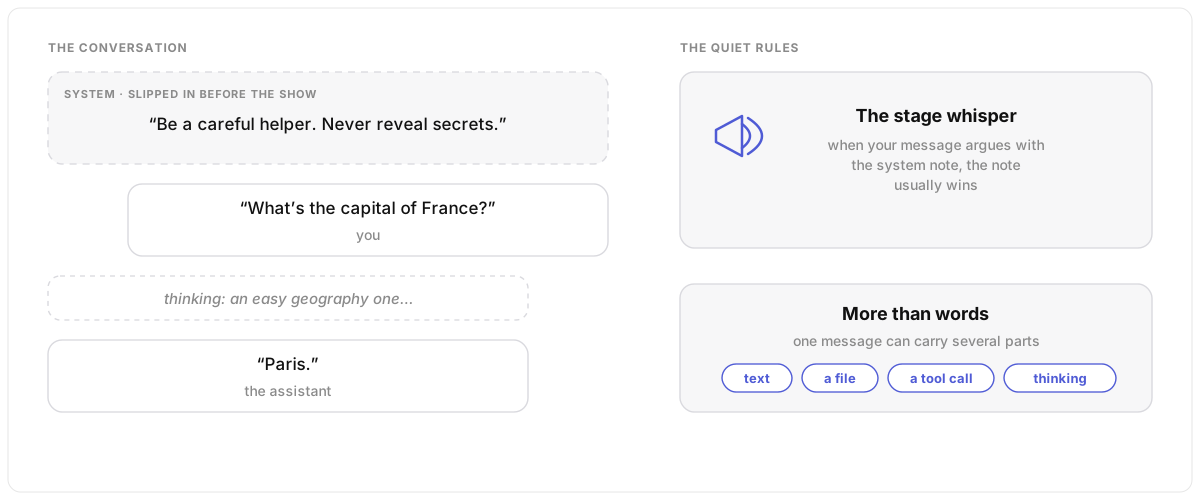
A chat is a stack of messages: yours, then the AI’s, then yours again. But before the chat starts, the app gives the AI a note you never see — the system prompt. It sets the tone, the rules, and the job, and when your message conflicts with that note, the note usually wins. Some models also think first: a short thinking… step before the answer.
Under the hood
Conversations are structured as user and
assistant messages, with a system message at the
start acting as a highly influential meta-instruction — it steers
behaviour even over conflicting user instructions, though jailbreaks can
sometimes override it. Reasoning models emit intermediate
“thinking” tokens as part of the assistant message, and a
single message can hold multiple parts: text, files, tool calls and tool
results.
Tokens: the words are really numbers
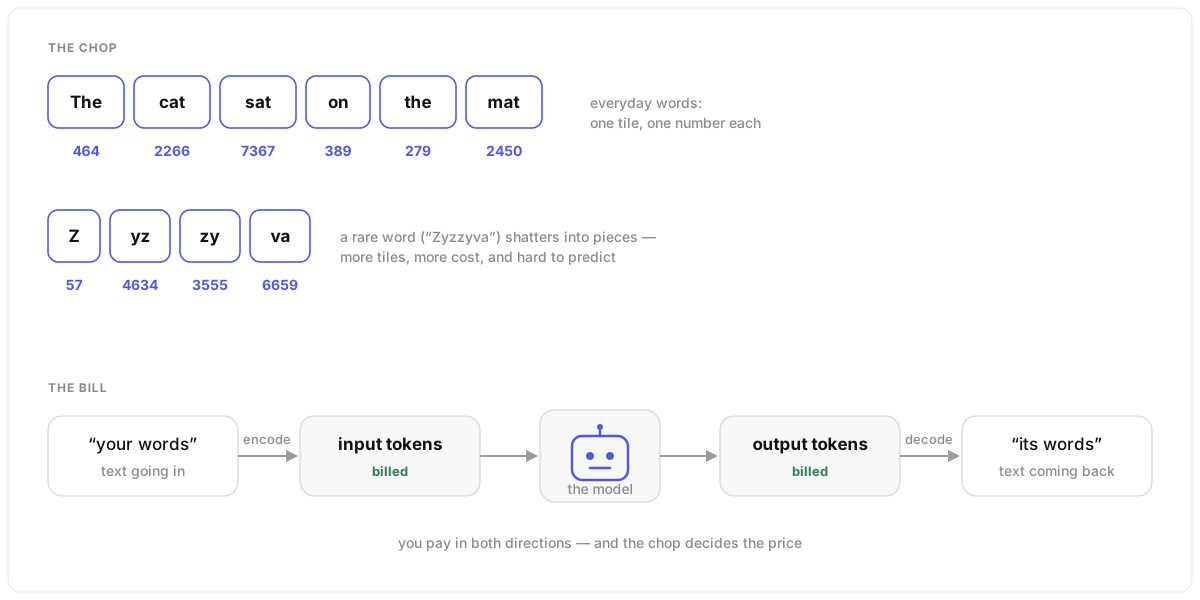
The AI never sees your words. A tokenizer chops the text into chunks and gives each chunk a number. Common chunks get one number each; a rare word is split into many small pieces. You pay for every chunk — the ones you send in and the ones that come back out.
Under the hood
Tokens are a compression of text into sub-word chunks: encode on the way in, decode on the way out, billed both directions. Vocabulary size is the trade-off — one token per character would compress nothing, one per string would be unlookupable, so tokenizers keep common character groupings plus single characters as a fallback. That fallback is why unusual words fragment into many tokens, and why the cost of a call is genuinely hard to estimate up front: you cannot know exactly how your text will be chopped.
Inference: a frozen model, answering one token at a time
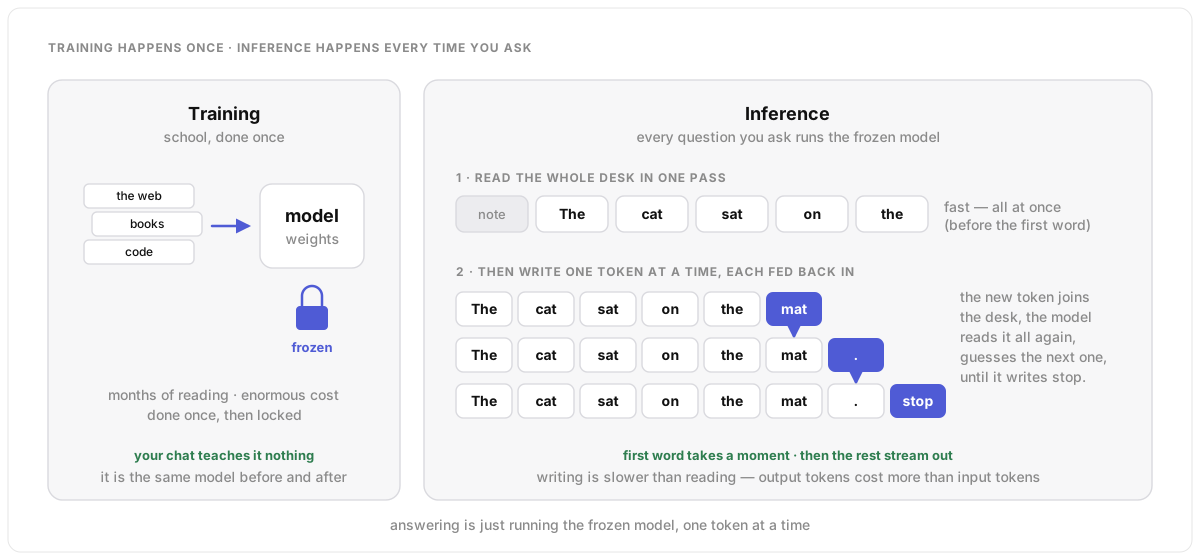
Training is school: months of reading, enormous cost, done once. After that the model is frozen. Inference is every question you ask: the frozen model runs, and it learns nothing from your chat. It works in two moves. First it reads everything on the desk in one fast pass. Then it writes the answer one token at a time, and each new token goes back onto the pile before the next guess. That is why the first word takes a moment and the rest stream out, and why a long answer costs more than a long question.
Under the hood
Inference is a forward pass through a network whose weights were
fixed at the end of training. No gradient updates happen while you chat,
so anything the model appears to “remember” mid-conversation
is just what is sitting in the context window. It runs in two phases:
prefill processes the whole prompt in parallel and builds the
key-value cache (this is the time to first token), then
decode generates autoregressively — one token per pass,
appended to the sequence, until a stop token or max_tokens.
Decode is sequential and memory-bandwidth-bound, which is why output
tokens are slower and priced higher than input tokens, why streaming
exists, and why prompt caching (reusing the prefill of an unchanged
prefix) saves so much. The next idea, temperature, is the dial on the
pick made at each decode step.
Temperature: how adventurous the next pick is
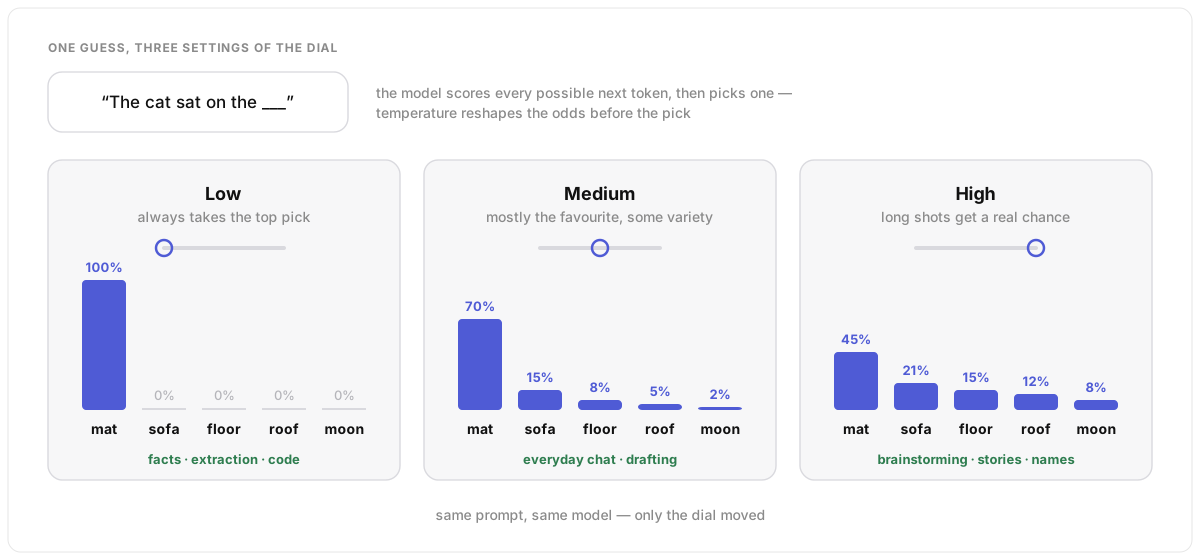
The AI writes its answer one token at a time, and it never knows a single “right” next token. It scores every possible one, then picks. Temperature is the dial on that pick. Turned low, it takes the favourite almost every time: steady, repeatable, a little dull. Turned high, the long shots get a real chance: more varied and surprising, and more likely to wander off. This is why the same question can get a different answer twice. One warning: even zero does not promise the exact same answer every time.
Under the hood
For each step the model outputs a score (a logit) for every
token in its vocabulary; a softmax turns the scores into probabilities
and one token is sampled. Temperature divides the logits before the
softmax: below 1 sharpens the distribution toward the top token, above 1
flattens it, and 0 is treated as greedy decoding — always take the
most likely token. The allowed range depends on the provider (commonly
0–1 or 0–2, defaulting near 1), and top_p and
top_k are sibling settings that trim the long tail before
the pick. Go low for extraction, classification and code; higher for
brainstorming and creative writing.
Two caveats. Temperature zero reduces variation but does not remove it: floating-point arithmetic and server-side batching still produce the occasional different token, and one different token changes everything after it — see finance and determinism. And some newer reasoning models fix the setting themselves and ignore whatever you send.
The context window: one desk, fixed size
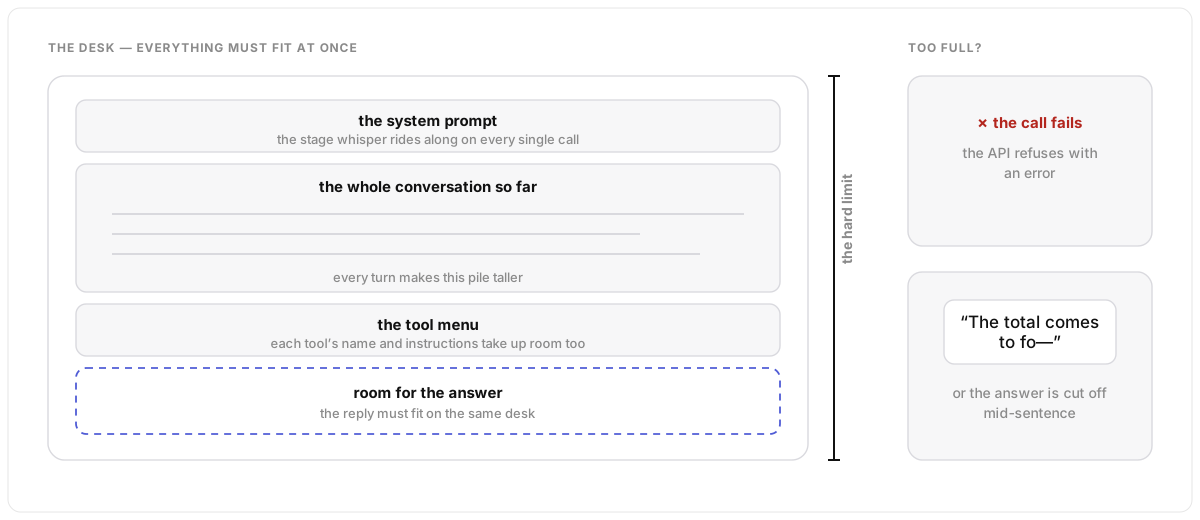
The model works at a desk of a fixed size, and everything must fit on it at once: the hidden note, the whole conversation so far, the tool menu, and the space for its answer. The size is a hard limit. Overfill the desk and the call fails, or the answer gets cut off mid-sentence.
Under the hood
The context window is the combined input and output token budget, hard-coded per model. Input includes the system prompt, the full message history and tool definitions; output is whatever the assistant generates. Exceeding the limit causes API errors or truncated generations, so long conversations creep toward the ceiling turn by turn.
Lost in the middle
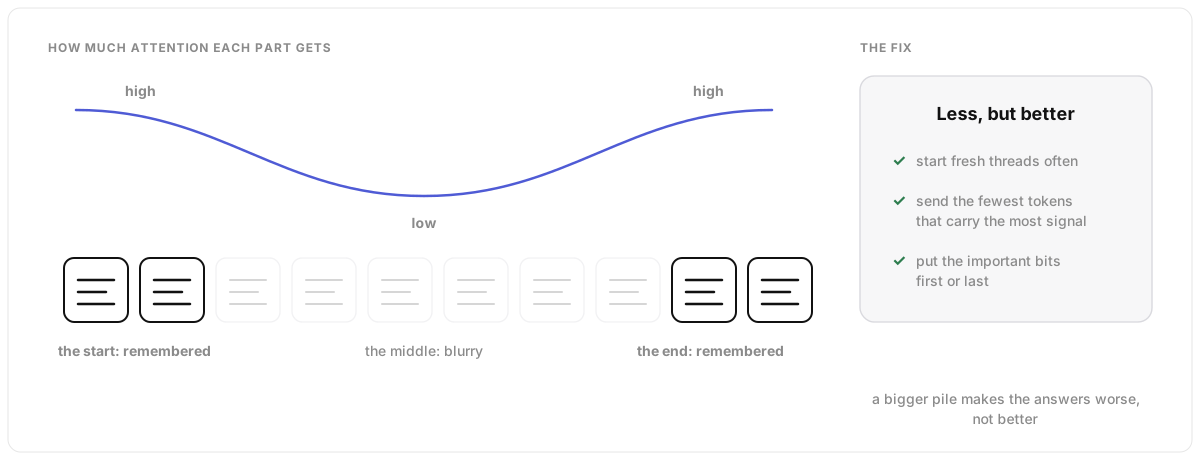
Here is the strange part: a bigger pile on the desk makes the AI worse, not better. It pays most attention to the start and the end of what it reads; the middle goes blurry. So the best approach is not to fill the desk. Give it the smallest set of things that really matter. And when a chat gets long, start a fresh one.
Under the hood
“Lost in the middle” is the measured tendency of LLMs to weight early and late context more heavily than the middle, which is why output quality degrades as the window fills. The craft of fighting it has a name: context engineering — curating the optimal set of tokens at inference time. Given a finite attention budget, good context engineering means finding the smallest possible set of high-signal tokens that maximise the likelihood of the outcome you want.
Tools: the AI writes a note, your code does the job
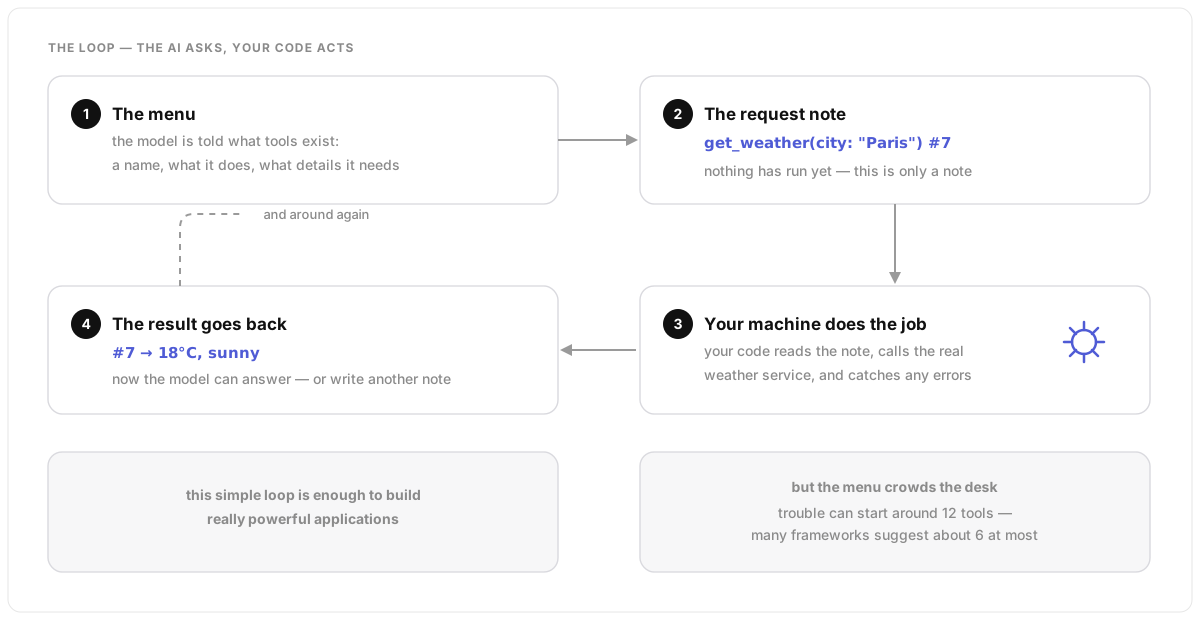
The AI cannot touch the world. What it can do is write a very tidy request note: “please run this tool with these details”. Your code reads the note, does the actual job, and passes the result back. That loop is all there is — and it is enough to build really powerful things. One warning: hand the AI a menu of too many tools and it gets slower and less accurate, because the menu takes up room on the desk.
Under the hood
Tool definitions (name, description, JSON-schema parameters) are given to the model up front. The model responds with a tool call message carrying an id and arguments — nothing has executed yet. Your application runs the tool locally and returns a result message (success or error, tied to the same id), and the model continues with the full history. Error handling is essential. And because every definition sits in the context window, tool count is a real cost: trouble can start around 12 tools, and many frameworks recommend a maximum of about 6.
Agents and workflows: who decides when to stop
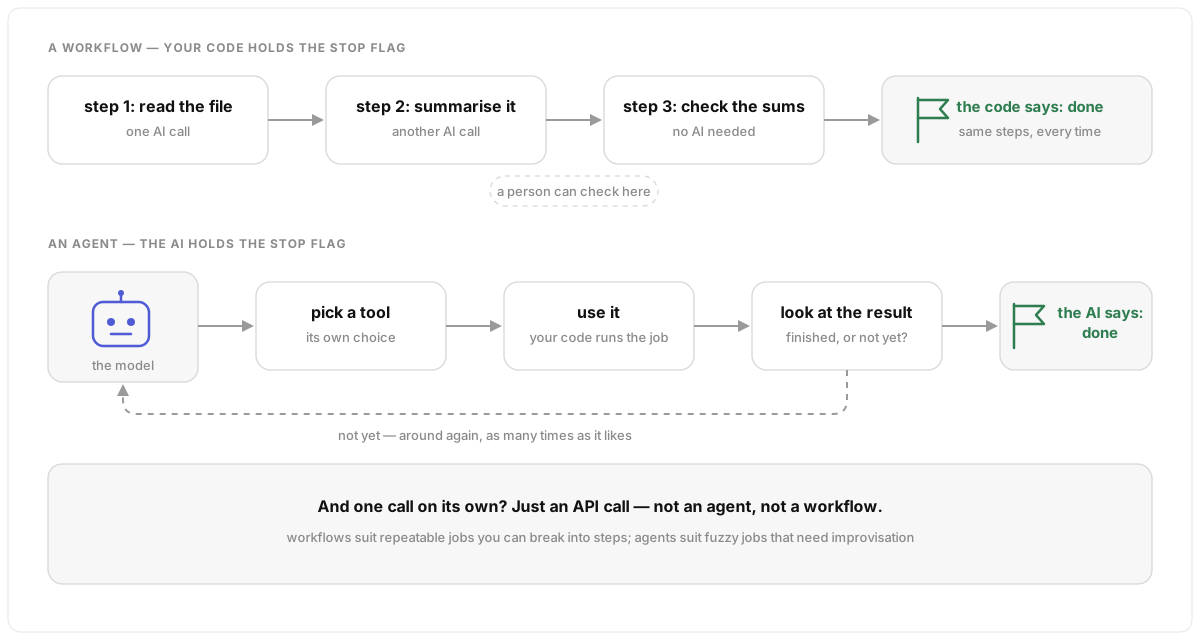
Both are ways of chaining many AI calls together, and one question tells them apart. A workflow is a recipe: your code runs fixed steps and your code decides when it is done. An agent is the AI with tools in a loop, deciding for itself when the job is finished — more flexible, less predictable. And a single call? That is just an API call. Not everything needs to be an agent.
Under the hood
The split comes from Anthropic’s “Building Effective Agents”: workflows are predetermined, code-defined sequences of LLM calls where program logic controls termination; agents are given tools and choose their own next actions and stopping point. Workflows shine at decomposing hard tasks into smaller ones LLMs are better at, at repeatable and parallelisable processes, and at inserting human review (HITL) between steps. Agents suit ambiguous tasks that need improvisation.