CTI's MCP Server: Making the Coach Composable
In the previous post I covered CTI's reinforcing evals loop — how prompts, skills, traces, and Evalite combine so the coaching layer improves with every user interaction. That whole machinery still lives behind one front door though: CTI's web UI. If you wanted Claude to schedule your threshold workouts around your meetings, recap your week into Gmail every Monday, or DM you on Slack when your TSB drops below −25, you had no way in.
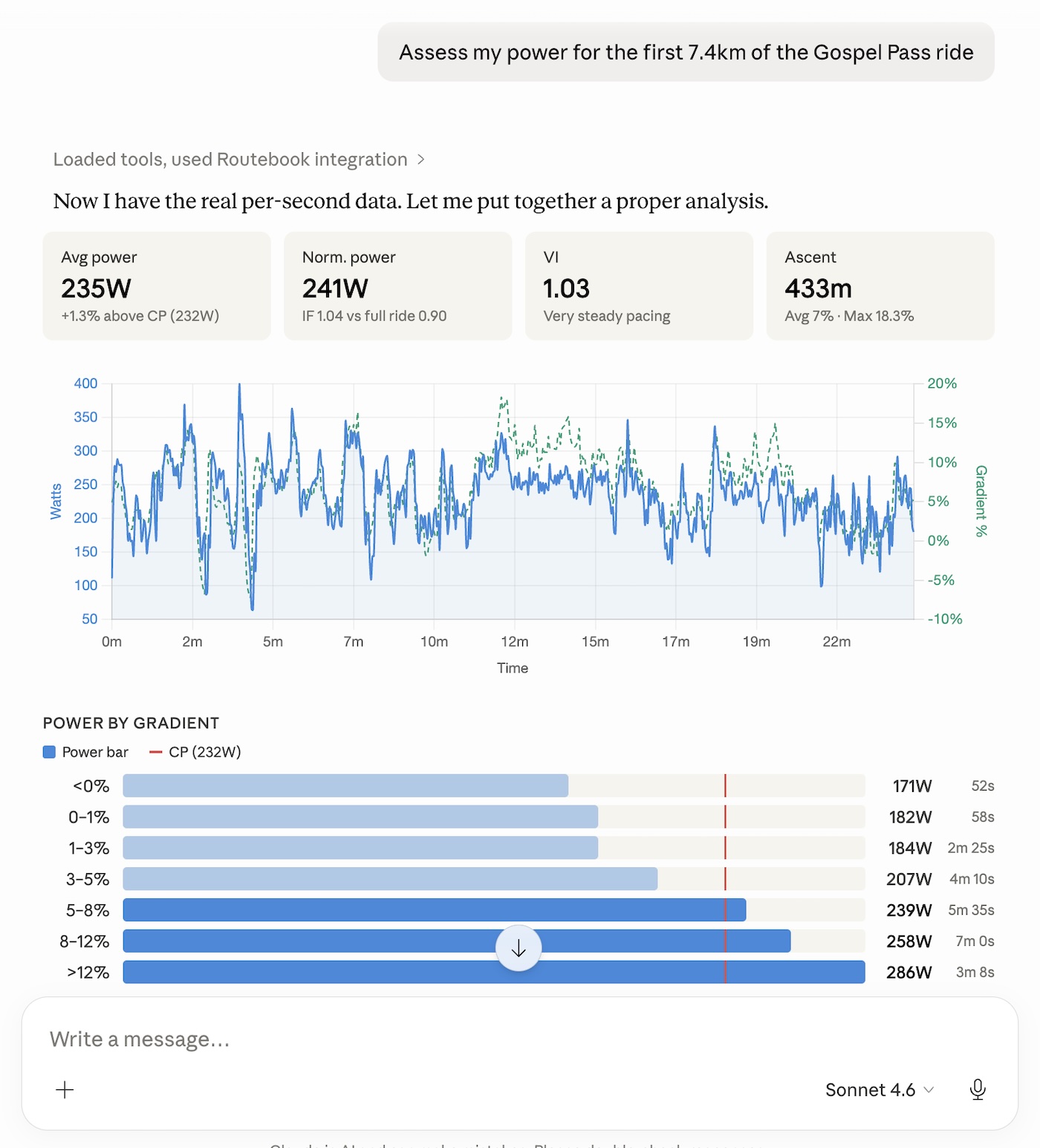
This post covers the next move: shipping an authenticated Model Context Protocol server so CTI becomes a building block in your agent, not just a hosted product. Connect Claude Desktop once, and CTI's rides, fitness state, profile memory, workout generator, and coach become composable with Google Calendar, Gmail, Slack, Notion, MyFitnessPal, Home Assistant — anything else with an MCP server.
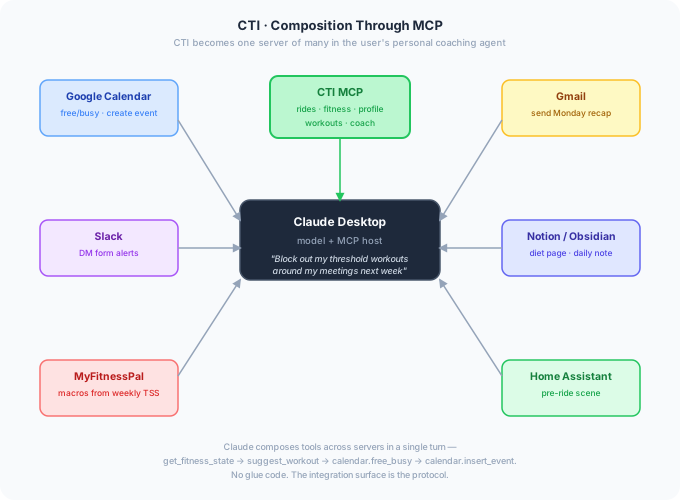
The interesting parts aren't the MCP spec itself — the TypeScript SDK does most of the heavy lifting. The interesting parts are how the server fits into the existing Next.js app, how authentication works without a separate identity service, and how every tool stays strictly scoped to one user even when the request originated from a third-party client.
Architecture: One Next.js Route, Two Transports of Identity
There's no separate service. The whole MCP server lives at app/api/mcp/[...rest]/route.ts inside the existing CTI app. It reuses Vercel Fluid Compute, the existing domain, TLS, the Supabase admin client, and — most importantly — the same lib/* functions the web UI calls. A search from Claude Desktop and a search from CTI's globe view hit identical code; only the authenticated identity differs.
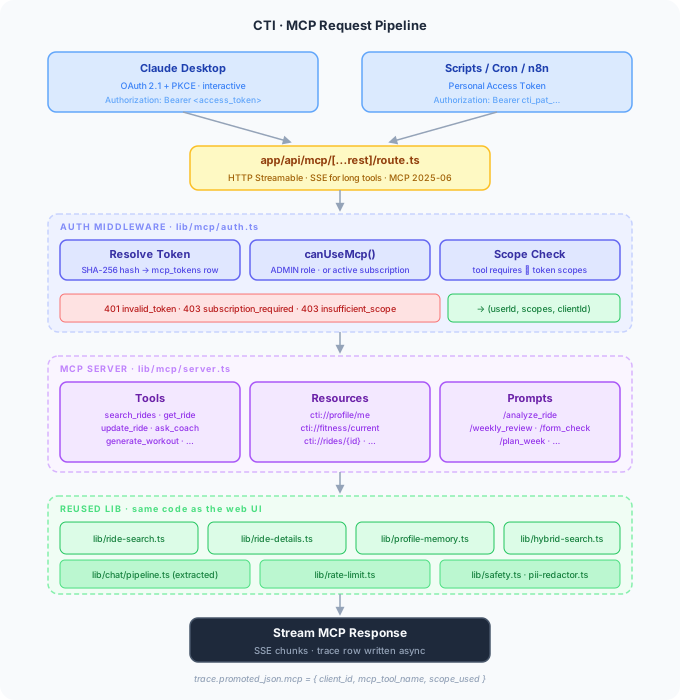
The transport is HTTP Streamable per the MCP 2025-06 spec, with SSE for tools that stream long output (like ask_coach). The route accepts a bearer token, runs it through middleware to resolve identity and scopes, then hands the parsed request to a singleton McpServer instance. The handler executes the tool, calls into the existing libraries, and streams the result back.
The thing that took the most thought wasn't the request flow — it was the auth. CTI's existing auth is Supabase session cookies. There's no long-lived token, no API key, no OAuth-as-resource-server pattern in the codebase. MCP needs both interactive auth (Claude Desktop walks the user through a flow) and programmatic auth (a cron job calling the server from n8n), without weakening anything that already exists.
Two Auth Mechanisms, One Token Table
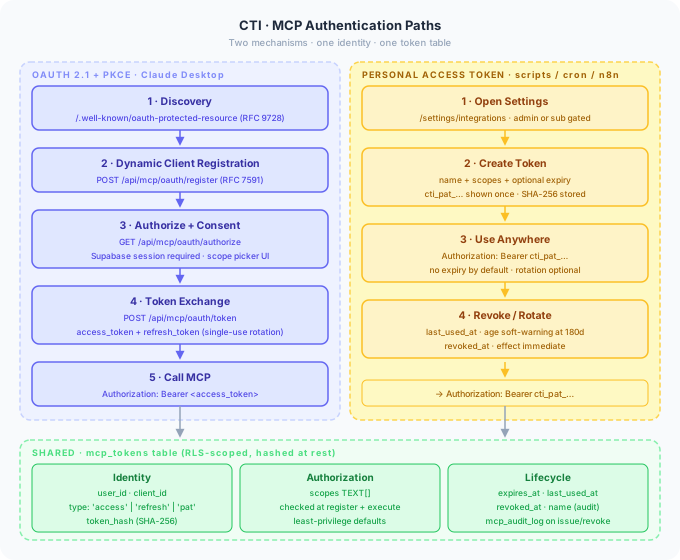
Both paths resolve to the same underlying mcp_tokens row, which means downstream code only ever asks "who is this user, what scopes do they have" — it doesn't care how the token was issued.
OAuth 2.1 + PKCE for Claude Desktop
Claude Desktop expects an MCP server to behave like a standards-compliant OAuth resource server. That means three new well-known endpoints and three new API routes, all of which read or write to the new mcp_tokens table:
GET  /.well-known/oauth-authorization-server   # RFC 8414 metadata
GET  /.well-known/oauth-protected-resource     # RFC 9728 (points at /api/mcp)
POST /api/mcp/oauth/register                   # RFC 7591 dynamic client registration
GET  /api/mcp/oauth/authorize                  # consent UI (re-uses Supabase session)
POST /api/mcp/oauth/token                      # code exchange + refresh
The consent UI is a normal Next.js page. It requires an existing Supabase session — if the user isn't signed in, it redirects to /auth/login first, then back to the consent screen. The page renders the requested scopes, the user clicks Authorize, an authorization code is issued, and Claude Desktop exchanges it at /api/mcp/oauth/token for an access token + refresh token.
A few deliberate choices fall out of this:
- Access tokens are opaque random bytes, not JWTs. Opaque tokens are revocable in O(1) by deleting the row. JWTs leak metadata if the encoding is sloppy and require a key-rotation story; opaque tokens require neither.
- Tokens are SHA-256 hashed at rest. The plaintext is shown to the user (or returned to Claude Desktop) exactly once. A database leak doesn't yield usable credentials.
- Refresh tokens rotate single-use. Every refresh issues a new pair and invalidates the old one.
- Dynamic client registration is open. This is the conventional MCP UX — the user shouldn't have to register a client out-of-band — and the per-user consent screen plus per-client rate limits keep it safe.
Personal Access Tokens for Scripts
OAuth is the right shape for an interactive client like Claude Desktop. It's the wrong shape for a cron job calling the API from a self-hosted n8n instance, or a one-off shell script piping data into a daily note. For those cases CTI exposes Personal Access Tokens (PATs) from a new /settings/integrations page.
A PAT is just another row in mcp_tokens with type='pat' and (by default) no expires_at. The user names it ("Zapier weekly recap"), picks scopes, and the page shows the token exactly once in the format cti_pat_…. From then on the script attaches Authorization: Bearer cti_pat_… to every MCP request.
The shared schema is what makes this clean:
create table mcp_tokens (
  id            uuid primary key default gen_random_uuid(),
  user_id       uuid not null references profiles(id) on delete cascade,
  client_id     text,                          -- null for PATs
  type          text not null check (type in ('access','refresh','pat')),
  token_hash    text not null,                 -- SHA-256, unique
  scopes        text[] not null,
  name          text,                          -- audit / UI
  expires_at    timestamptz,
  last_used_at  timestamptz,
  revoked_at    timestamptz,
  created_at    timestamptz default now()
);
Resolution is one indexed lookup on token_hash, with a couple of cheap predicates:
// lib/mcp/auth.ts (simplified)
export async function resolveToken(bearer: string) {
  const hash = sha256(bearer);
  const { data: tok } = await admin
    .from('mcp_tokens')
    .select('user_id, client_id, scopes, expires_at, revoked_at')
    .eq('token_hash', hash)
    .maybeSingle();

  if (!tok) throw new HttpError(401, 'invalid_token');
  if (tok.revoked_at) throw new HttpError(401, 'invalid_token');
  if (tok.expires_at && new Date(tok.expires_at) < new Date()) {
    throw new HttpError(401, 'invalid_token');
  }
  if (!(await canUseMcp(tok.user_id))) {
    throw new HttpError(403, 'subscription_required');
  }
  // Async update; never blocks the request.
  admin.from('mcp_tokens')
    .update({ last_used_at: new Date().toISOString() })
    .eq('token_hash', hash).then(null, console.error);

  return { userId: tok.user_id, clientId: tok.client_id, scopes: tok.scopes };
}
canUseMcp(userId) is a new lib/entitlements.ts helper that returns true if the user has the ADMIN role or an active user_subscriptions row. It's checked on every request, not just at token issuance — if a subscription lapses mid-session, the very next MCP call returns 403 subscription_required with a resubscribe URL in the body. That's simpler than a token-revocation cron and gives the user an obvious path back in.
Scopes
Scopes are coarse-grained and additive. The defaults Claude Desktop requests are read-only; write and generation scopes only get granted if the user explicitly opts in on the consent screen.
| Scope | Enables |
|---|---|
rides:read |
List, search, read rides and metadata |
rides:write |
Update feeling/RPE/note/title/POIs, trigger Strava sync |
insights:read |
Ride insights, fitness state, weekly summary |
insights:generate |
AI-generated ride narratives (counts against budget) |
profile:read |
Read profile memory |
profile:write |
Upsert/delete profile memory entries |
workouts:generate |
Generate .zwo workouts (admin/sub gated) |
chat:history |
List, read, search past CTI chats |
chat:send |
Ask the coach (ask_coach, daily-capped) |
Scopes are checked twice: at tool registration (a tool the user lacks scope for never appears in tools/list) and again at execute time. The double-check is defence in depth — clients shouldn't need to be trusted to honour the registration result.
What the Server Exposes
MCP has three primitives — tools, resources, and prompts — and CTI uses all three. The split matters because it lets the host model do the right thing without orchestration code on the CTI side.
Tools — The Verbs
Tools are model-callable functions with JSON Schema input. CTI's tool surface mirrors the existing chat tools the AI architecture post described, plus a few management verbs the chat doesn't need (like update_ride or trigger_strava_sync):
| Tool | Scope | Backed by |
|---|---|---|
search_rides |
rides:read |
lib/ride-search.ts searchRides |
get_ride |
rides:read |
lib/ride-details.ts getRideDetails |
get_fitness_state |
insights:read |
fitnessAnalysis |
get_weekly_summary |
insights:read |
weeklySummary |
get_ride_insights |
insights:read |
attachments.insights (no AI call) |
generate_ride_narrative |
insights:generate |
/api/insights/generate |
read_profile / update_profile |
profile:read / profile:write |
lib/profile-memory.ts + zod schema |
update_ride |
rides:write |
/api/attachments/[id] PATCH |
generate_workout |
workouts:generate |
/api/ride-workout (admin/sub gated) |
trigger_strava_sync |
rides:write |
Manual Strava pull |
list_chats / get_chat / search_history |
chat:history |
History + RRF hybrid search |
ask_coach |
chat:send |
Streaming single-turn Q&A |
Each tool is a thin file under lib/mcp/tools/ that defines the input schema and delegates to the existing library function. There's almost no new business logic — the value of MCP is in the surface, not in reimplementing what the chat already does.
Resources — The Always-Available Context
Resources are read-only context the host model can reference by URI. They're cheap because the host caches them, so the model doesn't need to spend a tool call to know your FTP every time you ask about a ride:
| URI | Returns |
|---|---|
cti://profile/me |
Profile memory JSON |
cti://fitness/current |
{ ctl, atl, tsb, tss, weeklyTrend } |
cti://rides/recent |
Last 30 rides metadata |
cti://rides/{id} |
Ride summary |
cti://rides/{id}/insights |
Pre-computed insights |
cti://weekly-summary |
Last 7 days rollup |
cti://fitness/current and cti://weekly-summary cache for 5 minutes in process memory with tag-based invalidation — an upload, an update_ride, or a Strava webhook all bust the relevant tags. That keeps "what's my form?" near-free across a multi-turn conversation while still reflecting fresh data.
Prompts — The Slash Commands
Prompts are user-invocable templates the client surfaces as slash commands. They're how CTI's existing skills (/ride, /week, /form, /training) become available natively in Claude Desktop without any custom client work:
| Prompt | Args | What it does |
|---|---|---|
/analyze_ride |
ride_id |
Coaching breakdown of a specific ride |
/weekly_review |
— | Structured 7-day review with form trajectory |
/form_check |
— | Interprets current TSB; recommends today's load |
/plan_week |
start_date, constraints? |
Drafts a 7-day plan honouring form + constraints |
/suggest_workout |
ride_id, type? |
Proposes a structured workout targeting a weakness |
/diet_for_load |
week_start? |
Calorie/macro targets for the coming week |
Each prompt is a small template: it pre-fetches the relevant resources (cti://fitness/current, cti://weekly-summary, cti://profile/me), then asks Claude to produce the structured output the corresponding CTI skill would produce. The skills' instructions are mirrored — not duplicated — so a change to skills/week/SKILL.md flows into the MCP weekly_review prompt automatically on next load.
Reusing the Chat Pipeline for ask_coach
ask_coach is the most interesting tool because it has to behave exactly like a one-shot chat turn — same PII redaction, same intent router, same off-topic short-circuit, same safety layer, same streamText config. Reimplementing any of that would mean drift, and drift in safety code is the worst kind.
The fix was an extraction, not a rewrite. The existing app/api/chat/route.ts is 715 lines of handler logic with the actual pipeline tangled into request parsing and streaming. Step one was to lift the pipeline into lib/chat/pipeline.ts:
// lib/chat/pipeline.ts
export async function runChatPipeline({
  messages, userId, view, model, tools, system,
}: PipelineInput): Promise<PipelineResult> {
  redactMessages(messages);                     // PII first

  const intent = await classifyIntent(messages);
  if (intent.intent === 'off_topic' && intent.confidence > 0.8) {
    return { type: 'off_topic', text: OFF_TOPIC_REPLY };
  }

  const ctx = await loadContext({ userId, view, intent });
  const sysPrompt = buildSystemPrompt({ system, ctx, intent });

  return streamText({
    model: getModel(model),
    system: sysPrompt,
    messages,
    tools,
    temperature: intent.temperature,
    toolChoice: intent.toolChoice,
    maxSteps: 5,
  });
}
/api/chat/route.ts shrinks to a thin wrapper that handles auth + streaming response. lib/mcp/tools/ask-coach.ts calls the same runChatPipeline() with tools: { search_rides, get_ride, get_ride_insights } and an SSE response wrapper. Single source of truth for the safety and prompt-assembly logic. Either side of the fence can be changed without splitting the prompt versions tracked in the evals loop.
ask_coach has its own daily cap independent of the web UI's 50/day, controlled by MCP_ASK_COACH_DAILY_CAP (default 25). The cap exists because generation is the only MCP tool with an open-ended cost, and the operator wants a knob.
Memory Parity with the Web Chat
The pipeline reuse covers the generation step itself, but the web chat does substantial work on either side: it loads four kinds of context before the model runs, and it fires four extractions after. Auditing those was the part of the MCP build that needed a comparison test rather than a code review.
The bug report that surfaced it was simple: the same coaching question — "Today's challenge ride is 26km with 571m of climbing, all of it in the first 8km at average grade 5.5%. How am I looking and what's my strategy?" — asked twice, once in CTI's globe chat, once in Claude Desktop via MCP. The overall guidance was consistent. The specific power numbers and intensity factor differed by enough to matter. The web answer was anchored in past coaching sessions; the MCP answer wasn't.
There were two distinct gaps to close, and they fell on different sides of the pipeline.
Read side: episodic context
The web chat assembles four context blocks before generation: profile memory, view-specific context, search context (RRF over chat messages and session memories), and episodic context (high-level summaries of past coaching sessions). The first version of ask_coach was loading the first one and skipping the rest.
| Context source | Web chat | MCP ask_coach v1 |
MCP ask_coach now |
|---|---|---|---|
Profile memory (buildMemoryPromptBlock) |
✅ | ✅ | ✅ |
chat-globe system prompt |
✅ | ✅ | ✅ |
Tools (searchRides, fitnessAnalysis, weeklySummary, getRideDetails) |
✅ | ✅ (scope-gated) | ✅ (scope-gated) |
hybridSearch (RRF over chat messages + session memories) |
✅ | ❌ | ✅ |
searchRelatedChats (episodic summaries of past sessions) |
✅ | ❌ | ✅ |
| Ride context (FIT data + insights for an open ride) | ✅ | ❌ | ❌ (no open ride in MCP) |
| Context budget enforcement | ✅ | ❌ | ❌ (smaller inputs anyway) |
The fix was small. searchRelatedChats(userId, message, currentChatId?) previously required a currentChatId so it could exclude the active chat from results — making that argument optional let MCP call it with no chat scope. With both hybridSearch and searchRelatedChats wired in, ask_coach now injects the same <past_conversations> and <coaching_history> XML blocks the web chat does. After the change, the same climbing-strategy question returns power suggestions within ±5W between web and MCP. The remaining variance is just temperature.
Write side: persistence
The second gap was worse. ask_coach answered the question, streamed the response, and then did nothing. None of the four fire-and-forget extractions the web chat runs in onFinish were happening — so a fact a user revealed over MCP ("my FTP tested at 280W today") never reached profiles.memory, and no future session, MCP or web, could retrieve the exchange.
| Memory operation | Web chat | MCP ask_coach v1 |
MCP ask_coach now |
|---|---|---|---|
extractIncrementalMemory (lightweight per-turn) |
✅ | ❌ | ✅ |
extractMemoryFromMessages → mergeMemory |
✅ | ❌ | ✅ |
extractAndStoreSessionSummary (multi-turn episode) |
✅ | ❌ | ❌ (single-turn, no chatId) |
indexChatMessage + embed (turn becomes searchable) |
✅ | ❌ | ❌ (no chatId) |
The two extractions that landed are the higher-value ones — both write back into profiles.memory, which is the structure read on every future request:
// lib/mcp/tools/ask-coach.ts (post-stream)
result.consumeStream();
result.text.then(async (assistantText) => {
  await Promise.allSettled([
    extractIncrementalMemory({ userId, userText, assistantText }),
    extractMemoryFromMessages({
      userId,
      messages: [
        { role: 'user', parts: [{ type: 'text', text: userText }] },
        { role: 'assistant', parts: [{ type: 'text', text: assistantText }] },
      ],
    }),
  ]);
}).catch(console.error);
Fire-and-forget; never blocks the SSE response. Promise.allSettled because one extractor failing must not prevent the other from running.
The two extractions that didn't land both need a chatId to scope the writes. ask_coach is single-turn by design — it isn't backed by a chats row — so creating a synthetic chatId per MCP call is possible but increases coupling between the chat schema and the MCP entry point. I left it out of v1 in favour of shipping the higher-value extractions.
What still differs by design
Two intentional asymmetries remain:
- No ride context. The web app's map view binds a specific open ride to the conversation, so the model has FIT-level telemetry and pre-computed insights inline. MCP is always globe-mode-equivalent. For "how should I pace this climb?" that's fine — the tools fetch what they need. For "analyse this specific ride" the right path is
get_ride+generate_ride_narrativerather thanask_coach. - No verbatim chat indexing. MCP turns aren't added to
chat_messages, so a future hybrid search won't surface this exact exchange. The two memory extractions still capture the facts — just not the verbatim turn. That's a deliberate trade against schema coupling; an MCP-session-as-chat row would close it.
The pattern that fell out of this is worth keeping in mind for any future MCP integration on a stateful app: anything you reuse from a chat handler has to be audited on both sides of the generation step. It's easy to ship the read side — call the same pipeline, get the same answer shape — and miss that the write side, the fire-and-forget extractions that make the next answer better, was implicit in the original handler and got dropped on extraction. The fix is mechanical; finding the gap requires a comparison test.
Per-User, Per-Client Rate Limits
The existing checkDailyRateLimit() in lib/rate-limit.ts was keyed on user_id only. That's wrong for MCP — a user who connects Claude Desktop and runs a Zapier cron and has the web UI open shouldn't be able to starve themselves. The fix:
// lib/rate-limit.ts (extended)
export async function checkDailyRateLimit({
  userId, clientId = 'web', costClass,
}: RateLimitInput) {
  const cap = caps[costClass];                   // 'cheap' | 'generation' | 'ask_coach'
  const used = await getDailyUsage(userId, clientId, costClass);
  if (used >= cap) {
    throw new HttpError(429, 'rate_limited', { retryAfter: secondsUntilUtcMidnight() });
  }
  await incrementDailyUsage(userId, clientId, costClass);
}
clientId is 'web' for the existing web UI, the OAuth client_id for Claude Desktop, or the PAT name for scripts. Cost classes split cheap reads from expensive generation, so a chatty search_rides cron can't eat into the daily generation budget.
Tracing Every MCP Call
The eval loop from the last post depends on every AI response writing a trace row. MCP slots into this without ceremony — each tool call goes through the same withTrace() wrapper, with the MCP-specific fields stuffed into promoted_json.mcp:
// lib/trace.ts (extended fields)
promoted_json: {
  // existing tags + fixture payload
  mcp: {
    client_id: 'claude-desktop' | 'cti-pat-zapier-recap' | …,
    mcp_tool_name: 'search_rides',
    scope_used: 'rides:read',
  }
}
The admin trace UI gains a source=mcp filter so the daily triage inbox can be sliced by where the response came from. A regression that only manifests through an MCP client is just as catchable as one from the web UI — same prompt versioning, same fixture promotion flow, same pnpm eval gate.
Security Posture
Most of the security work is structural rather than novel:
- DB scoping by resolved
user_id. Every query passes through the admin Supabase client withuser_idfrom the token. Client-supplied IDs are never trusted. Arides:readtoken withuser_id=Acannot ever return a row owned byuser_id=B— there is no code path that constructs the query without that filter. - Hashed tokens at rest. SHA-256, unique. Plaintext shown once.
- Refresh rotation. Single-use, invalidated on next refresh.
- Defence-in-depth scope checks. Once at registration, again at execute time.
- Per-user, per-client, per-cost-class rate limits. With separate buckets for cheap reads and generation.
- PII redaction on
ask_coachinputs. Same redactor as the web UI; runs before the model sees a single character. - Strict zod schemas on every tool input. Unknown fields rejected.
generate_workoutadmin gate. Scope grants eligibility; the role check is the actual gate.- CORS locked.
/api/mcponly accepts known MCP client origins. - Audit log. Every consent, token issuance, and revocation lands in
mcp_audit_log.
The cross-user test is the one that matters most — every QA pass walks two test accounts in parallel and confirms a token from account A cannot return any data belonging to account B, on every tool, every resource, every prompt.
Verification
The verification plan is layered, smallest scope first:
- Auth. Create a PAT at
/settings/integrations.curl -H "Authorization: Bearer cti_pat_…" /api/mcp/pingreturns 200. The MCP Inspector populates the tool list. - Tools. From Inspector, call
search_rides(period="this_week")and verify the response matches the/routesweb UI for the same user. Compareget_fitness_stateCTL/ATL/TSB to the existingfitnessAnalysistest fixtures. - OAuth. Configure Claude Desktop with the CTI URL. Walk the full flow — discovery, register, authorize, token exchange, tool call — and confirm refresh works and revocation from
/settings/integrationskills the session. - End-to-end. Trigger
/weekly_reviewin Claude Desktop. Verify resources are read, tools are called, and the response matches what the same skill produces in the CTI web UI. - Cross-user. Two test accounts, both connected. Account A's token must never return Account B's rides under any tool. Scope test: a
rides:read-only token must 403 onupdate_ride. Admin gate test: a non-admin token withworkouts:generatescope must still 403 ongenerate_workout. Burst test: blow past the daily cap and confirm 429 withRetry-After. - Memory parity. Ask the same coaching question through the web globe chat and through
ask_coach. The substantive guidance — power range, IF, pacing strategy — should match within tolerance. Then mention a fact only over MCP ("FTP tested at 280W today"); confirm it appears inprofiles.memoryafter the response completes and is referenced in the next session.
What I'd Do Differently
The hardest part of this whole thing wasn't writing the MCP server — it was the auth surface. Three well-known endpoints, three OAuth routes, a token table, an audit log, an entitlements helper, and a settings UI. That's a lot of new attack surface for what is fundamentally "expose the existing chat tools to a different transport". A future version could plausibly delegate OAuth to a shared identity provider rather than rolling it into the app, but I wanted the first version to be self-contained and not introduce a hard dependency on a third-party service.
The 5-minute resource cache is in-memory per Vercel function instance. That works at current traffic, but it's a foot-gun — different instances will return different cached data for up to 5 minutes after an invalidation event. Moving this to a small Redis-backed cache with proper tag invalidation would tighten consistency without changing the surface.
The MCP source filter on the trace UI is binary (mcp vs web), which is fine today but won't scale. Once there are several active integrations, distinguishing "Zapier weekly recap" from "n8n form-check" matters for triage. The data is already in promoted_json.mcp.client_id; the UI just needs a faceted filter.
Conclusion
The shift from "CTI is a hosted product" to "CTI is one server in your agent" is small in code but large in posture. Every tool the web UI calls is now callable by anything you trust enough to hand a scoped token to. The same searchRides, the same fitnessAnalysis, the same runChatPipeline — just over a different transport, with a different identity, and (crucially) the same eval loop watching it.
Three things made this practical without rewriting the app: the existing libraries were already structured around (supabase, userId) rather than around request objects, so they slotted into MCP tool handlers with no changes; the chat pipeline was extractable from the route handler, so ask_coach reuses the same safety and prompt machinery without drift; and the trace + eval system already keyed off prompt versions and tool names, so MCP traffic appears in triage as a first-class citizen.
The interesting part now isn't the server — it's what users build with it. A Monday recap email written by Claude. A Slack form alert when TSB drops. A diet page that updates from next week's planned TSS. None of those workflows need any code from CTI. They need a token, a few scopes, and the model doing what models are good at: composing tools across servers in a single turn.
Stack additions since Part 3: @modelcontextprotocol/sdk, OAuth 2.1 + PKCE (RFC 7636), dynamic client registration (RFC 7591), authorization-server / protected-resource metadata (RFC 8414 / 9728), MCP HTTP Streamable transport, MCP Inspector
Built with: Claude Opus 4.6 via Claude Code CLI
Want an MCP server for your domain? If you're building a domain-specific AI product and want to expose it as a properly scoped, properly authenticated MCP server — composable with Claude Desktop, n8n, Zapier, and the rest of an agent's toolbox — that's the work Orbital does. Read the CTI case study →
The CTI series:
- Building Cycling Training Intelligence in One Week with Claude Code
- CTI's AI Architecture: How the Coaching Layer Works
- CTI's Reinforcing Evals Loop: Prompts, Skills, Traces & Telemetry
- CTI's MCP Server: Making the Coach Composable
- CTI's Fitness Metrics: TSS, CTL, ATL, TSB — the Numbers Behind the Coach
- Future-Proofing CTI: An Architecture Review and Roadmap