Example Projects
These projects show the problems I solve: making distributed systems explorable, designing effective human-in-loop AI, and building interfaces for complex technical infrastructure.
Each one needed integration work that off-the-shelf tools could not do.
- Document Substrate: Document AI for professional practices: parse, PII redaction, schema-driven extraction and a deterministic verification engine, so a cloud LLM can work on client files it is never allowed to see
- Cycling Training Intelligence: Interactive 3D geospatial route viewer plus an AI coaching layer based on the rider's own data, with three-tier memory, hybrid retrieval, a reinforcing evals loop, and an authenticated MCP server
- Deep Search: Production AI research pipeline with observability and evaluation frameworks
- Darwinium: Making complex fraud networks visible through interactive graph visualization
- Syft: Real-time monitoring for globally distributed instrument fleets
- Mersen R-TOOLS: Engineering simulation UX handling long-running async compute workloads
Document Substrate: AI on Documents You Can't Send to a Model
The Problem: The documents most worth building AI on (bank statements, tax returns, invoices, financial statements) are the documents that contain the most personal information. A professional practice can't send raw client files to a cloud LLM, and a local model is less capable on the work that most needs capability. Putting extracted text into a prompt also fails: tables are lost in flat text extraction, and "what were the total repairs in Q2?" is an aggregation over structured data, not a semantic search over prose. In accounting work, a wrong verdict costs more than a wrong sentence. An invented explanation is embarrassing. An invented completeness verdict is a professional liability.
What I Built: The Document Substrate: a reusable foundation (parse, redact, classify, extract, index) with three separate layers so the model only ever sees placeholders, and a verification-first workflow layer built on top of it for accounting practices. The rule is one sentence: the model reads and suggests, code checks and decides, a person signs. No model call is allowed to determine completeness or do arithmetic. It is deployed as one install per customer, set up from a shared foundation repo.
The Ingest Pipeline
- Six durable Inngest steps (
parse → redact → classify → chunk_embed → summarize → ready), each independently retryable, idempotent at the database level, and resumable from any earlier step - LlamaParse handles OCR and layout reconstruction; documents over 40 pages are sharded into 25-page windows submitted concurrently and awaited with a durable sleep-poll rather than a blocking request
- Extraction is not a pipeline step. As a step, one extract failure stopped the run before embedding and left a parseable document unsearchable, so it has its own function, its own status, and its own concurrency cap, and the document stays answerable in chat throughout
- Every extracted value is traced to its page: re-located in the page text with the same matcher that highlights citations, and stored with its page and character span. Without that, a number that was never on the page looks the same as one that was
- Confidence-gated auto-classification files a document by its contents, not its filename. Above the threshold the type is applied automatically (guarded so it can never overwrite a human decision). Below it, the type stays a suggestion
The PII Boundary
- Three-stage hybrid redaction: regex rules for anything with a fixed shape or checksum (IRD, NZ and AU bank accounts, NZBN, credit cards with a Luhn check), a Haiku pass on every page for what only context reveals (people, organisations, addresses), and an independent detector as a final check
- Real values are encrypted into an entity vault with AES-256-GCM; the redacted text becomes canonical for everything downstream. Embeddings, chunks, summaries, extracts, prompts, transcripts and traces hold only placeholders
- Placeholders are scoped per document with a short document code (
[A1B2C3D4_PERSON_1]) so the same string can never stand for two different people across a corpus, which the plain[PERSON_1]form allowed - Hydration is the most tightly controlled step: it refuses to run without an explicit document scope, refuses placeholders outside that scope, runs server-side after the model has finished reasoning, and writes an immutable audit row every time
- A pre-flight scan on every outbound prompt fails closed if it matches PII. Matching the same person across files is proposed by fuzzy clustering, judged by an LLM, and then confirmed by a person, because a wrong match shows one person's data under another's name
Retrieval and Query
- Six parallel retrieval legs (vector, keyword, entity, fuzzy, plus boost legs) fused with Reciprocal Rank Fusion, preceded by a document-grain router that answers "which document?" before chunk search answers "where exactly?"
- The user's question is redacted before retrieval: plaintext mentions are rewritten into the placeholders the index holds
- Citations deep-link to the page, and clicking one opens the source document beside the answer with the passage highlighted
- Two deterministic checks on the answer: an output guard that repairs or withholds the answer, and a figure guard that flags any number no excerpt supports. The model never does arithmetic. Code sums the stored figures, kept separate per currency
Verification-First Workflows
- A workflow is a saved job over a client collection (job type, reporting period, file selection) with two separate statuses, so "the job crashed" is never confused with "the client hasn't sent their bank statements"
- Validation checks what goes in: a pure TypeScript engine assigns documents to slots by confirmed type and checks presence, period and cross-document consistency. Same files, same verdict, every time. A check that cannot run returns
needs_review, never a silent pass - Verification checks what comes out: the generated workpaper is reconciled against the documents it was built from, and a figure that traces to nothing is marked unsupported rather than passed
- 22 document types carry extraction schemas; 18 of them carry arithmetic checks: a bank statement must foot from opening to closing balance, an invoice's lines must add to its subtotal, dates must fall inside the stated period. A failed reading gets exactly one repair attempt, accepted only if it introduces no figure absent from the page
- One verification queue collects everything waiting on a person: stale runs, readings whose checks fired, and open exceptions, so a reviewer works through a queue instead of searching through files
- Completed runs generate an
.xlsxworkpaper and a.docxdraft client letter through deterministic renderers, with no LLM in the mapping, so the letter cannot state a figure the workpaper doesn't carry
The Practice Manual
- Four external reports recommended an ontology, possibly graph-backed. They gave too little weight to one finding: the registries already are the ontology. Extract schemas declare the nouns and workflow definitions declare the rules. What shipped is a pure function over those registries that emits a machine-readable manifest, computed on request and never checked in, so it cannot go out of date
- The graph database was rejected for three reasons. The deciding one was structural: entity names are exactly what the vault encrypts, so a graph outside Postgres must either replicate cleartext PII outside RLS and the audit trail, or store placeholders nobody can query by name. Neither is acceptable
- Alongside it is the practice manual: the firm's own written account of how each job is worked, in prose, versioned in git. A contract test reads every chapter and fails the build if a named rule no longer exists, or if a workflow gains a rule no chapter covers, so the manual cannot go out of date
- The manual explains and links; it never drives engine behaviour. The order of authority is registry → manifest → manual
The Quality Loop
- A thumbs-up or thumbs-down on any answer goes to a Triage inbox, where each rated answer is promoted into the permanent golden set or captured as a regression case, so every future change is tested against both before it ships
- Evalite suites split into deterministic scorers that gate CI and LLM-judged suites that are read as a trend, never a gate. On the redaction suite,
NoLeakmust stay at 1.0 across every case - The evals run the same executor the production route runs. The two diverged once, and the evals scored a pipeline that wasn't the one in production
- Langfuse and OpenTelemetry for prompt-versioned traces, per-user spend caps and daily rate limits that render as an assistant turn explaining the limit, rather than a failed send
Stack: Next.js 16 (App Router), TypeScript, Supabase (Postgres + pgvector HNSW + RLS + private Storage), Inngest, LlamaParse, LlamaExtract, Vercel AI SDK + AI Gateway, Claude Sonnet and Haiku, text-embedding-3-small, AES-256-GCM, Uppy + TUS, Zod, TanStack Query, Jotai, Evalite, Langfuse, OpenTelemetry
Related writing:
- The Document Substrate: Solving Garbage In, Garbage Out for AI on Business Documents: why putting a PDF into a prompt fails, and the four steps that fix it
- The Document Substrate, Revisited: what changed after four months of real client documents
- Why "substrate"?: where the word comes from and what it implies
- Worked examples across six professions: the same three layers and three wrappers in six professions
Cycling Training Intelligence
The Problem: Indoor cycling training data was stored in binary files as numbers and GPS coordinates. Athletes needed to explore their training routes visually, and needed an AI coach whose advice was based on their actual power data, fitness trajectory and past coaching conversations, not the generic content an off-the-shelf LLM gives.
What I Built: A full coaching platform with four parts: an interactive 3D route viewer built from FIT files; an AI coaching layer with intent routing, layered prompts, three-tier memory and hybrid retrieval; a reinforcing evals loop that improves the coach with every user interaction; and an authenticated MCP server that makes the same coach available inside Claude Desktop, n8n, Zapier and other agent hosts. The coaching layer reasons over the Performance Management Chart (CTL/ATL/TSB), the same fifty-year-old impulse-response model human coaches use, so every recommendation is based on the rider's own numbers, not textbook averages.
3D Route Viewer
- 3D terrain rendering with cinematic camera animations following route progress
- Real-time synchronized charts for elevation, speed, power, heart rate, and cadence
- Binary FIT file parsing and validation with resumable TUS uploads
- M4 downsampling algorithm for 60fps performance with thousands of data points
AI Coaching Architecture
- PII redaction at the start of the pipeline, in one place, so no downstream code path can skip it
- Haiku-as-router classifies every message into one of five intents (workout generation, ride analysis, route search, coaching chat, off-topic) and off-topic messages are answered without a Sonnet call
- Ten-layer system prompt assembled per-request (safety block, view-specific base prompt, profile memory, ride data, route context, search context, episodic context, intent hint, skills manifest). Context is injected as XML tags, not free prose, so the model treats it as data rather than instructions
- Three-tier memory: permanent profile memory (FTP, weight, goals) on the user row; per-session episodic memories with key insights, athlete signals, and open questions; and full chat-message indexing chunked on structural boundaries
- Hybrid search via Reciprocal Rank Fusion across four parallel Supabase RPCs (keyword + semantic on chat messages and session memories), with a Haiku-extracted query analysis step targeting the right slice of history
- Skills system: markdown SKILL.md files with frontmatter for
/ride,/week,/form,/training, preloaded for known intents and discoverable at runtime vialist_skills/load_skilltools - Per-task model slot system through Vercel AI Gateway: Haiku for cheap high-frequency tasks, Sonnet for coaching responses, Gemini Flash Lite for insights, OpenAI embeddings for vectors. Swapping a model is a one-line config change
Reinforcing Evals Loop
- Prompt versioning with stable IDs flowing into both the
tracestable and Langfuse metadata, so every AI response is permanently linked to the exact prompt version that produced it - Admin trace triage UI that promotes real production failures into Evalite golden + regression fixtures
- CI-runnable Evalite suite that gates prompt and skill changes against the fixture set
- OpenTelemetry + Langfuse telemetry for P50/P95 latency, token-per-response trends, cost breakdowns by model tier, and full multi-step span trees per prompt version
MCP Server
- OAuth 2.1 + PKCE for interactive clients (Claude Desktop) plus Personal Access Tokens for scripts and cron jobs, both resolving to the same opaque-token table with SHA-256 hashing at rest
- Tools, resources, and prompts mirroring the web chat (search rides, get fitness state, generate workouts, ask the coach) with coarse-grained additive scopes (
rides:read,insights:generate,chat:send, …) and double-checked authorization at registration and execute time - The
ask_coachMCP tool reuses the samerunChatPipeline()the web UI calls (same PII redaction, same intent router, same off-topic handling, same safety layer), so security and coaching logic cannot differ between transports - Per-user, per-client, per-cost-class rate limits so a frequent Zapier cron job can't use up the user's daily generation budget
Domain Model: PMC, TSS, CTL/ATL/TSB
- Critical Power and Normalized Power computed from raw
.fitfiles, feeding TSS for every ride - Performance Management Chart with exponentially weighted Fitness (CTL ~42d), Fatigue (ATL ~7d), and Form (TSB). This is the quantitative layer of the coaching substrate, used for every "how am I going?" and "should I push today?"
- Subjective Feeling and RPE captured per ride and merged with the objective metrics. This is the subjective layer, so the coach can tell when "TSB says you're fresh but you reported feeling cooked"
Stack: React, Next.js, TypeScript, Mapbox GL JS, Turf.js, Supabase (Postgres + pgvector HNSW + GIN full-text), Vercel AI SDK, Vercel AI Gateway, Claude Sonnet 4.6, Claude Haiku 4.5, OpenAI text-embedding-3-small, Gemini Flash Lite, Evalite, Langfuse, OpenTelemetry, @modelcontextprotocol/sdk, OAuth 2.1 + PKCE
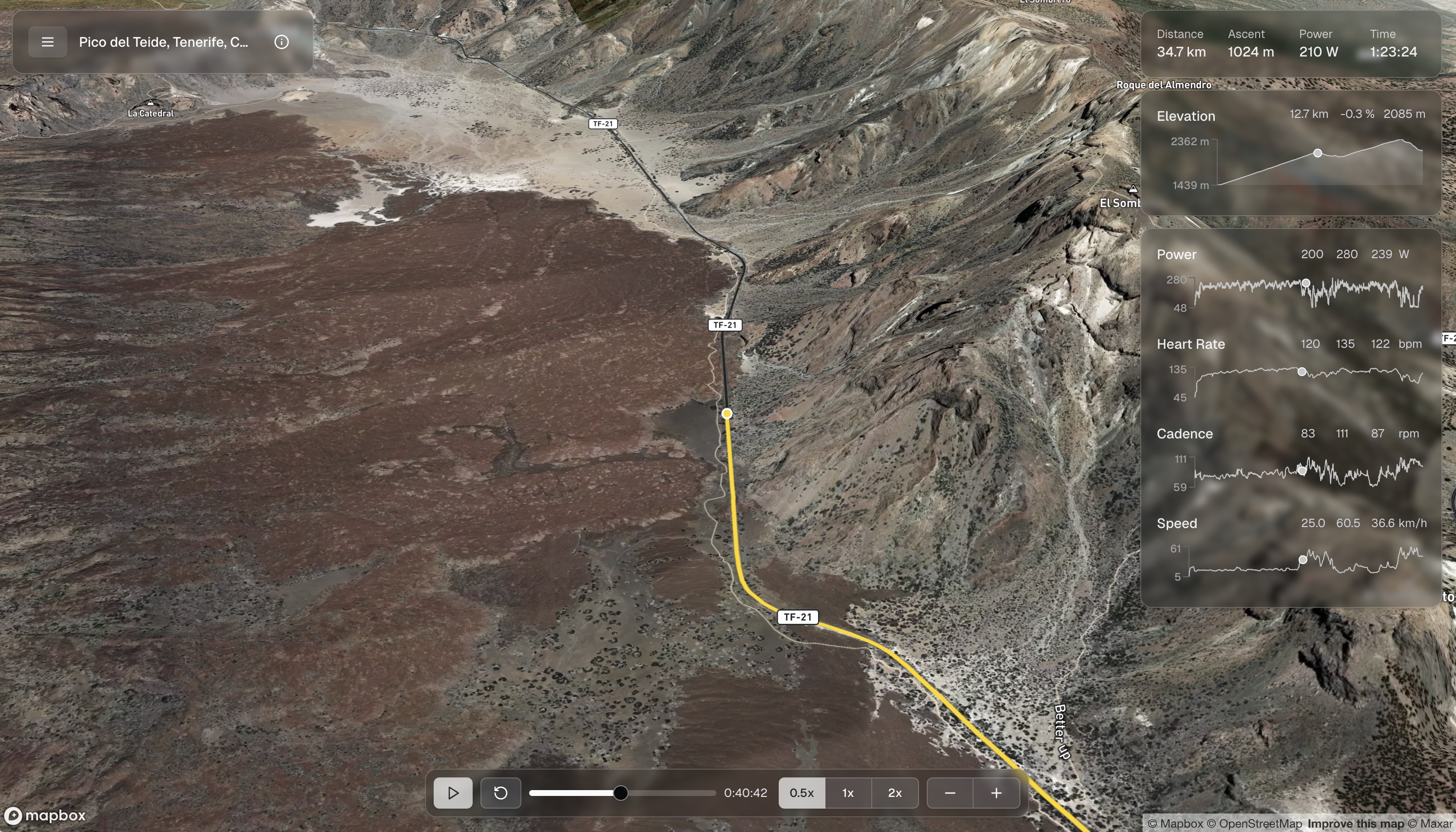
3D Cinematic Route: Pico del Teide, Tenerife, Canary Islands.
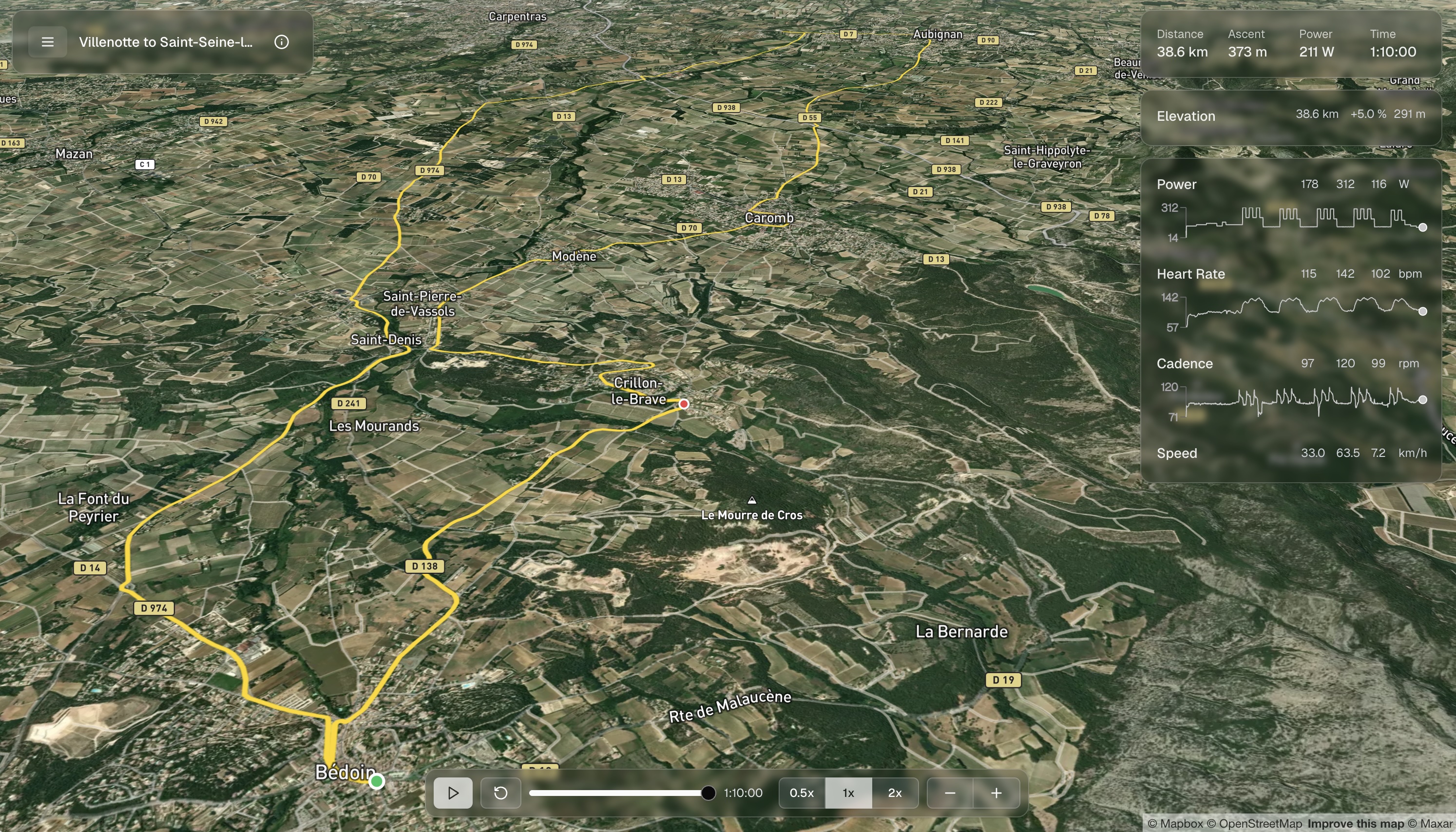
3D Cinematic Route with Workout Performance Charts: Rolling Thunder Workout, Villenotte to Saint-Seine-l'Abbaye, France.
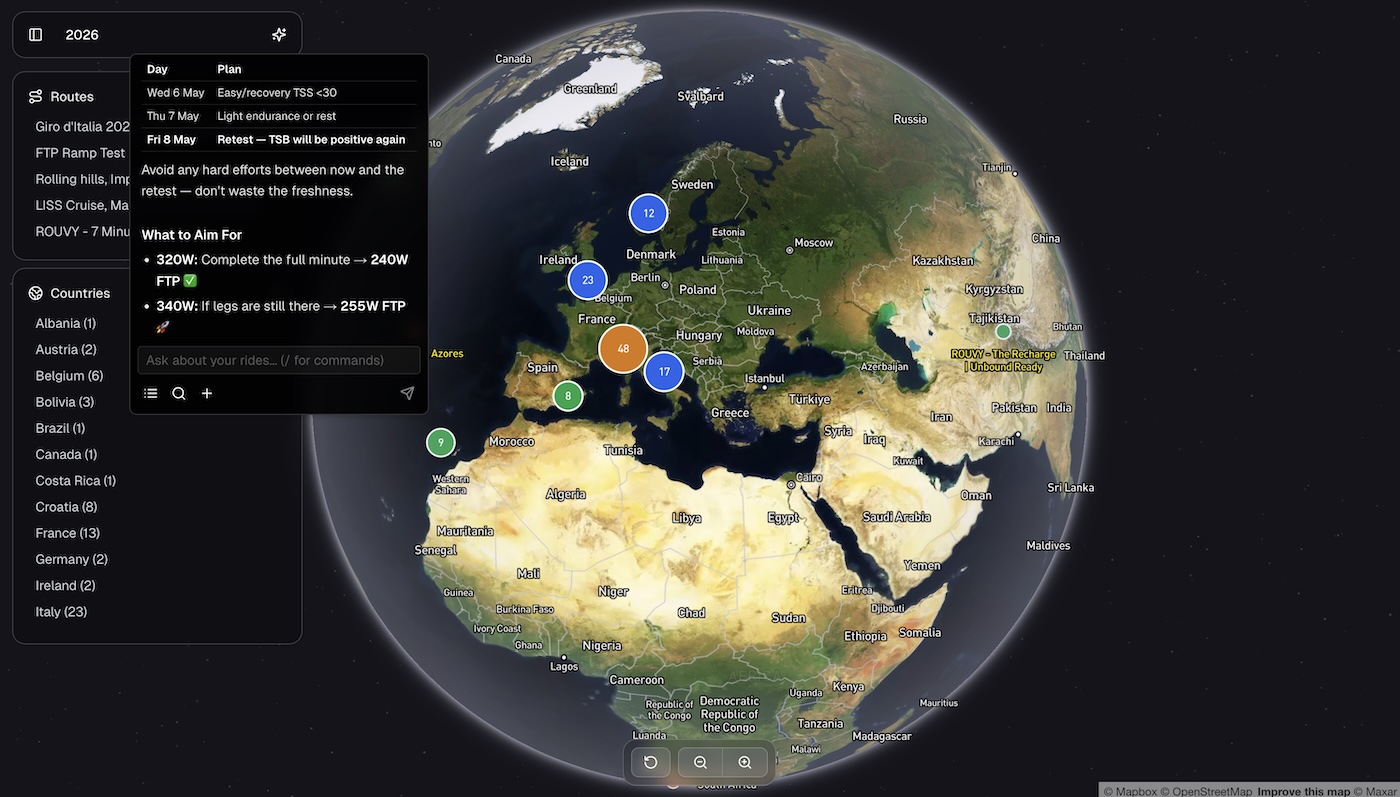
AI Coach: Coaching responses based on the rider's actual rides, fitness state, and past conversations. The chat sits alongside the globe view; the same runChatPipeline() runs whether the question came from the web UI or an MCP client.
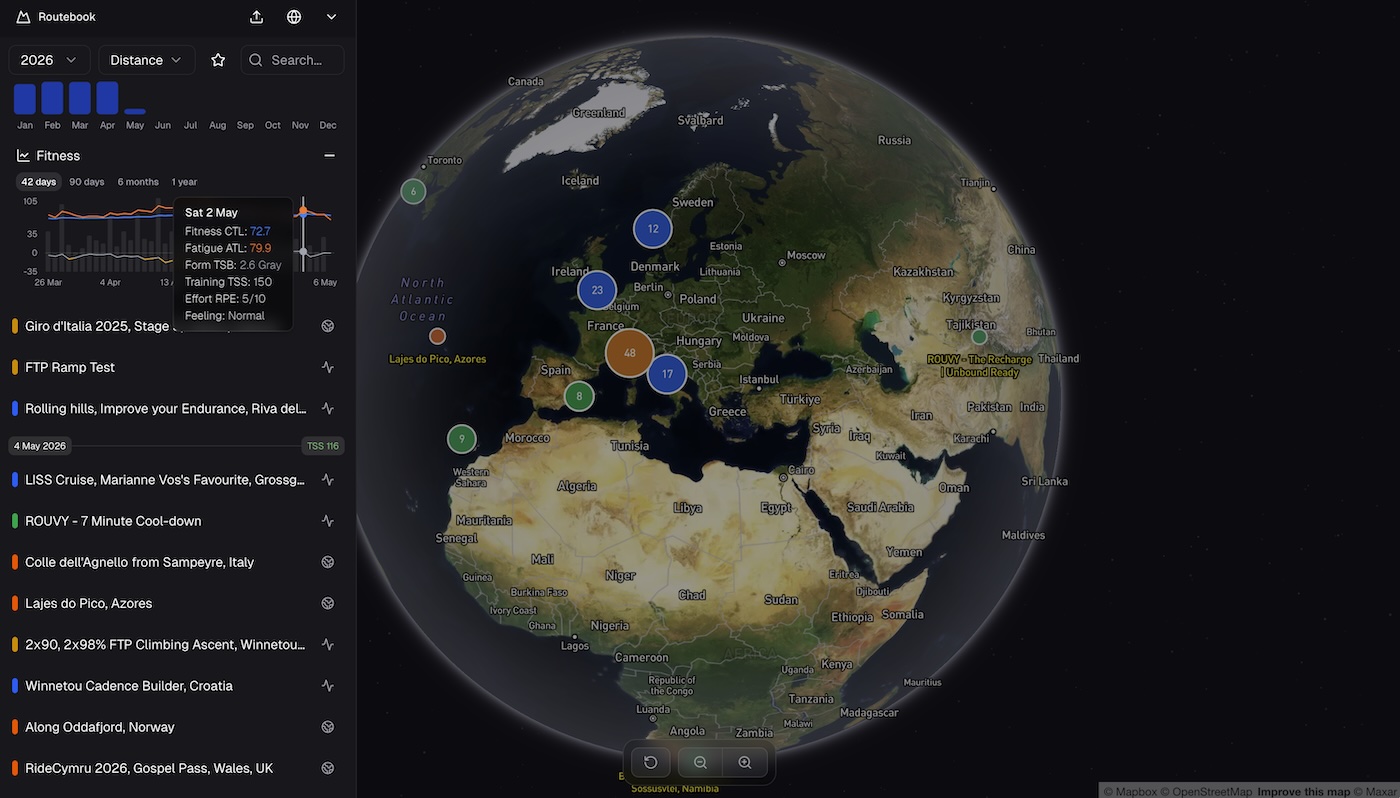
Performance Management Chart: CTL (Fitness), ATL (Fatigue), TSB (Form) computed from daily TSS. The quantitative layer the coach uses for every load and recovery decision.
The CTI series, full case studies:
- Building Cycling Training Intelligence in One Week with Claude Code: the foundation: 3D route viewer, FIT-file parsing, real-time charts
- CTI's AI Architecture: How the Coaching Layer Works: intent routing, layered prompts, three-tier memory, hybrid retrieval
- CTI's Reinforcing Evals Loop: Prompts, Skills, Traces & Telemetry: prompt versioning, trace capture, regression fixtures, triage UI
- CTI's MCP Server: Making the Coach Composable: OAuth 2.1, PATs, tools, per-user scoping
- CTI's Fitness Metrics: TSS, CTL, ATL, TSB: the quantitative layer the coach uses
- Future-Proofing CTI: An Architecture Review and Roadmap: what to revisit on every model release, where the architecture should evolve, what's missing
CTI is live in production at routebook.app.
Deep Search: Production AI Research Pipeline
The Problem: Generic AI search tools couldn't handle rate-limiting, prompt versioning, or provide observability needed for production use. Teams needed AI search they could deploy and monitor.
What I Built: A production deep search application with full engineering observability, evaluation frameworks, and prompt management. It is not a demo. It is designed to run reliably at scale.
Core Capabilities:
- Distributed rate-limiting across search providers
- Local evaluation framework for rapid iteration
- Full observability with traces and metrics
- Prompt versioning and A/B testing infrastructure
Stack: React, Next.js, AI SDK, Postgres, Redis
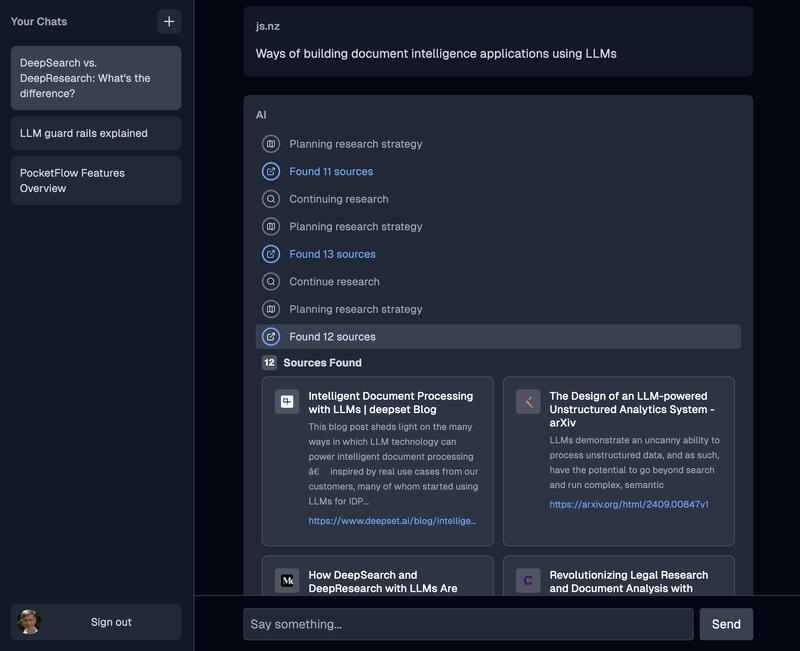
Deep Search Sources: Expandable showing sources scraped for detailed information.
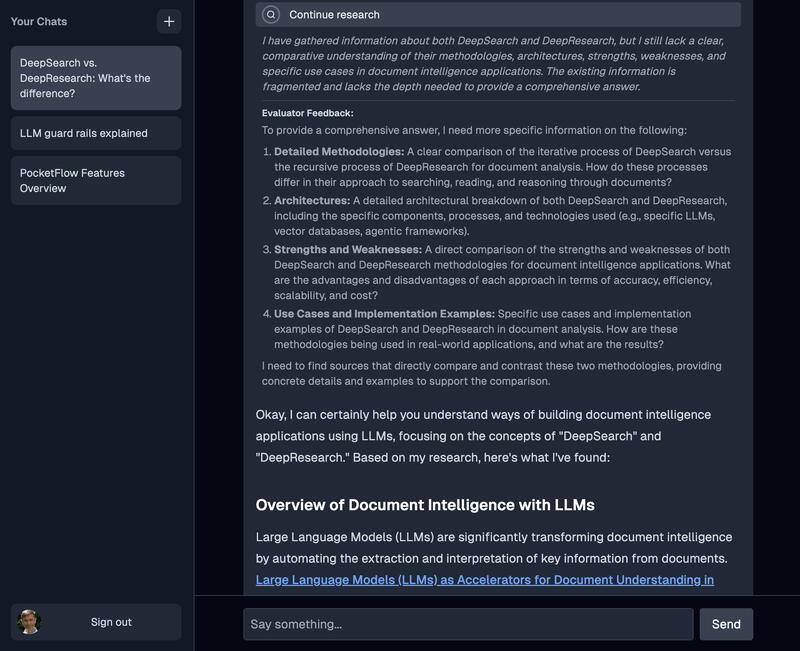
Deep Search Research: Expandable showing LLM response with planned actions.
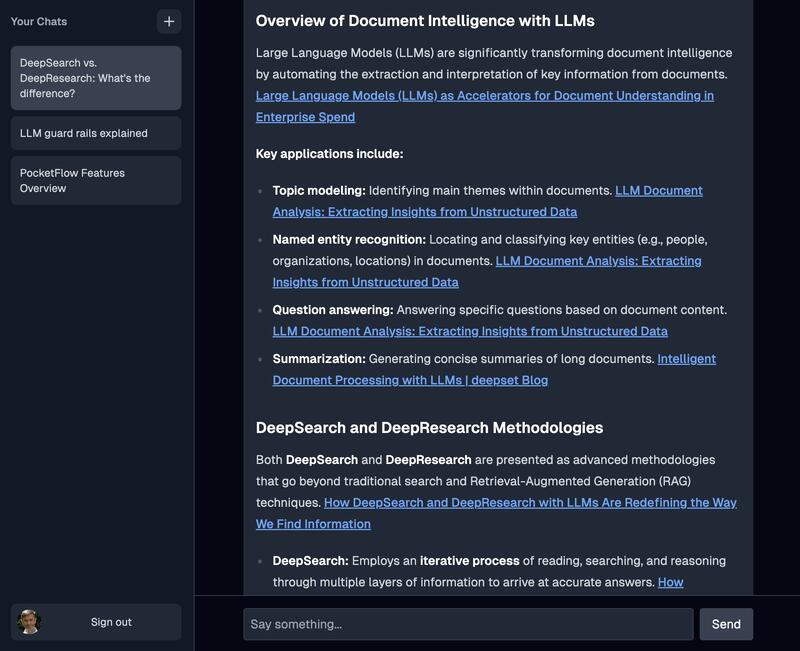
Deep Search Answer: Final answer with links for reference sources.
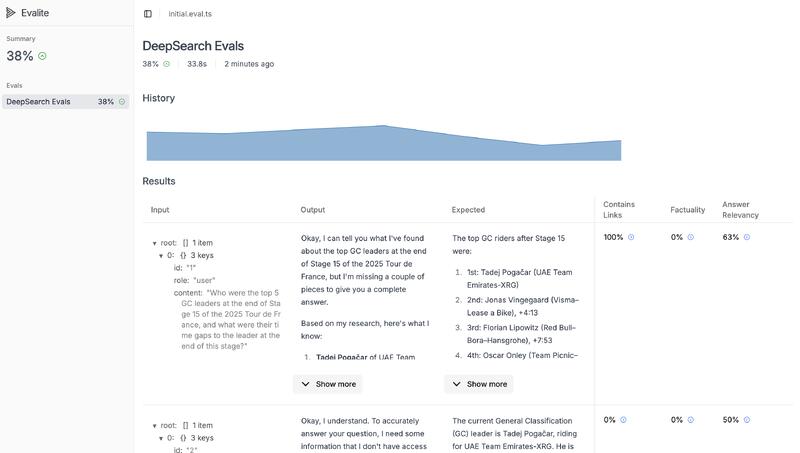
Deep Search Local Evals: Local evals run on your development server and make iteration quick and easy.
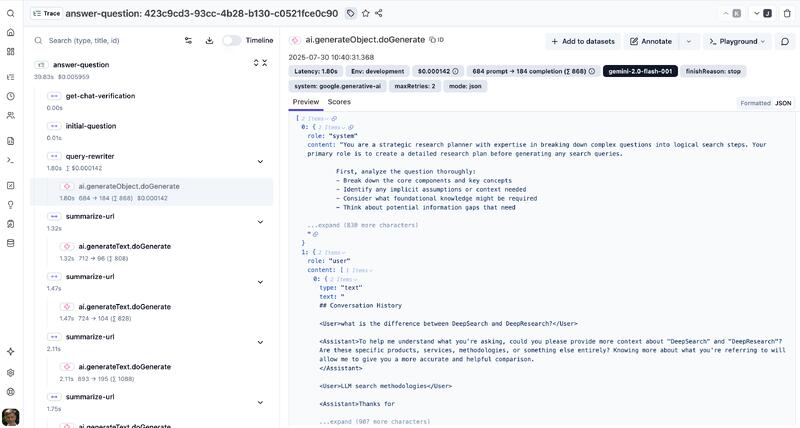
Deep Search Engineering Observability: Platform provides continuous observability with traces, evals and provides prompt management and metrics for continual improvement.
Darwinium: Making Fraud Networks Visible
The Problem: Fraud detection generates complex relationship graphs that are impossible to understand with standard dashboards. Analysts needed to explore network patterns in real-time, not just view static reports.
What I Built: Interactive network visualization and real-time dashboards that made fraud patterns explorable. Custom graph layouts, filtering, and grouping that showed patterns not visible in the raw data.
Core Capabilities:
- Interactive network graphs with custom node types and relationships
- Real-time dashboard system with user-configurable layouts
- Geospatial visualization with Mapbox integration
- High-performance rendering for large-scale fraud networks
Stack: React, AntV (G6), Mapbox, GraphQL
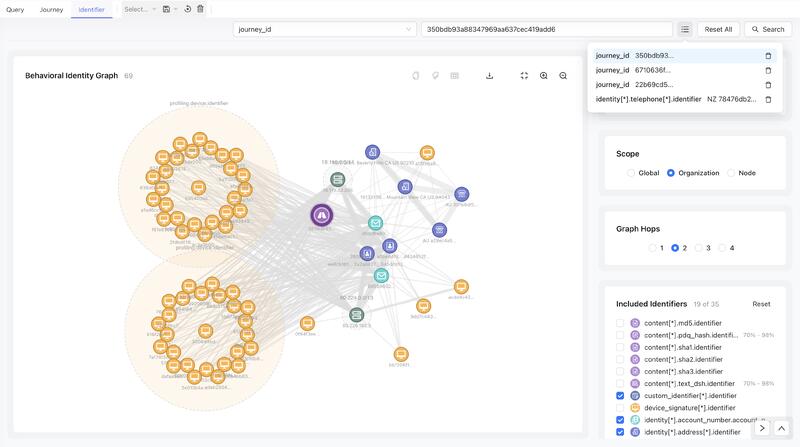
Identity Graph: Interactive Network Graphs with custom nodes, grouping, linking and filtering.
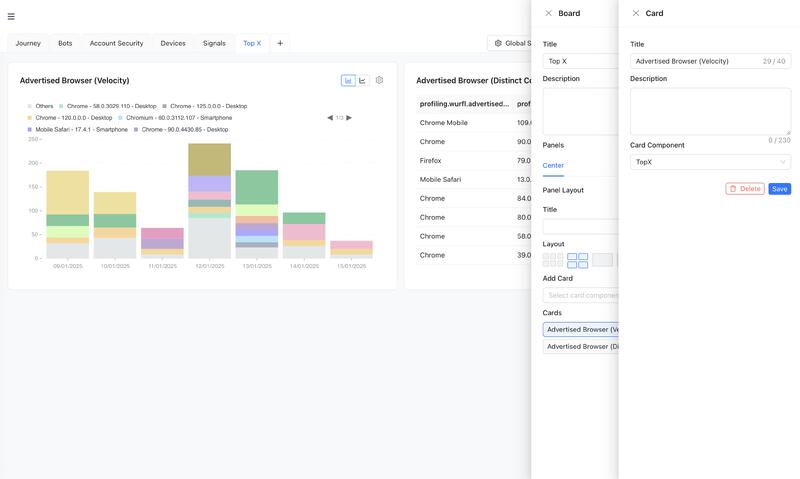
Dashboard Cards: Configurable cards allow selecting custom data rendering components for each card.
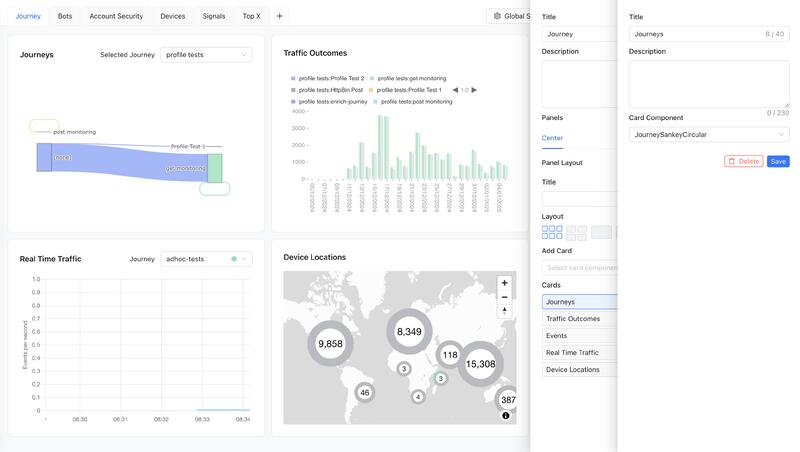
Dashboard Layout: Multiple dashboards are supported using tabs. Each dashboard has user configurable resizable panels and tab layouts. Panels have user configurable card layouts and card positioning.
Syft: Distributed Instrument Fleet Monitoring
The Problem: Mass spectrometry instruments deployed globally generated performance data that nobody saw until an instrument failed. Teams needed real-time visibility into instrument health across entire fleets.
What I Built: Real-time monitoring dashboard that ingested IoT data streams and showed instrument health patterns. Made distributed hardware infrastructure understandable through visual summaries and performance timelines.
Core Capabilities:
- Fleet-wide health visualization at a glance
- Real-time performance tracking for individual instruments
- IoT data ingestion and processing pipeline
- Context-aware help system tailored to customer configurations
Stack: React, Recoil, AntD, Python GraphQL, AWS IoT/data stack
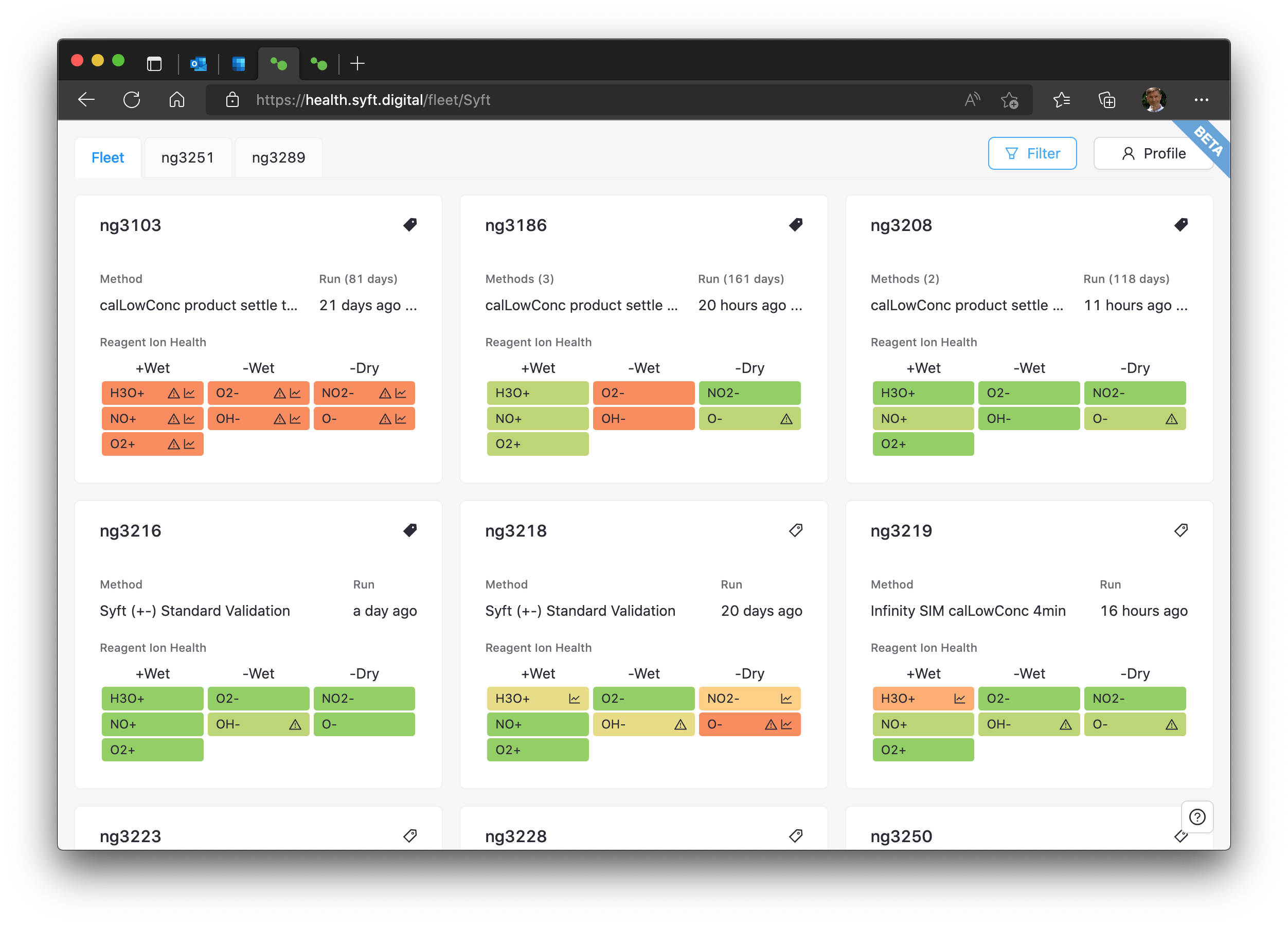
Instrument Fleet: Cards provide a quick visual overview of the health of all instruments deployed in the fleet.
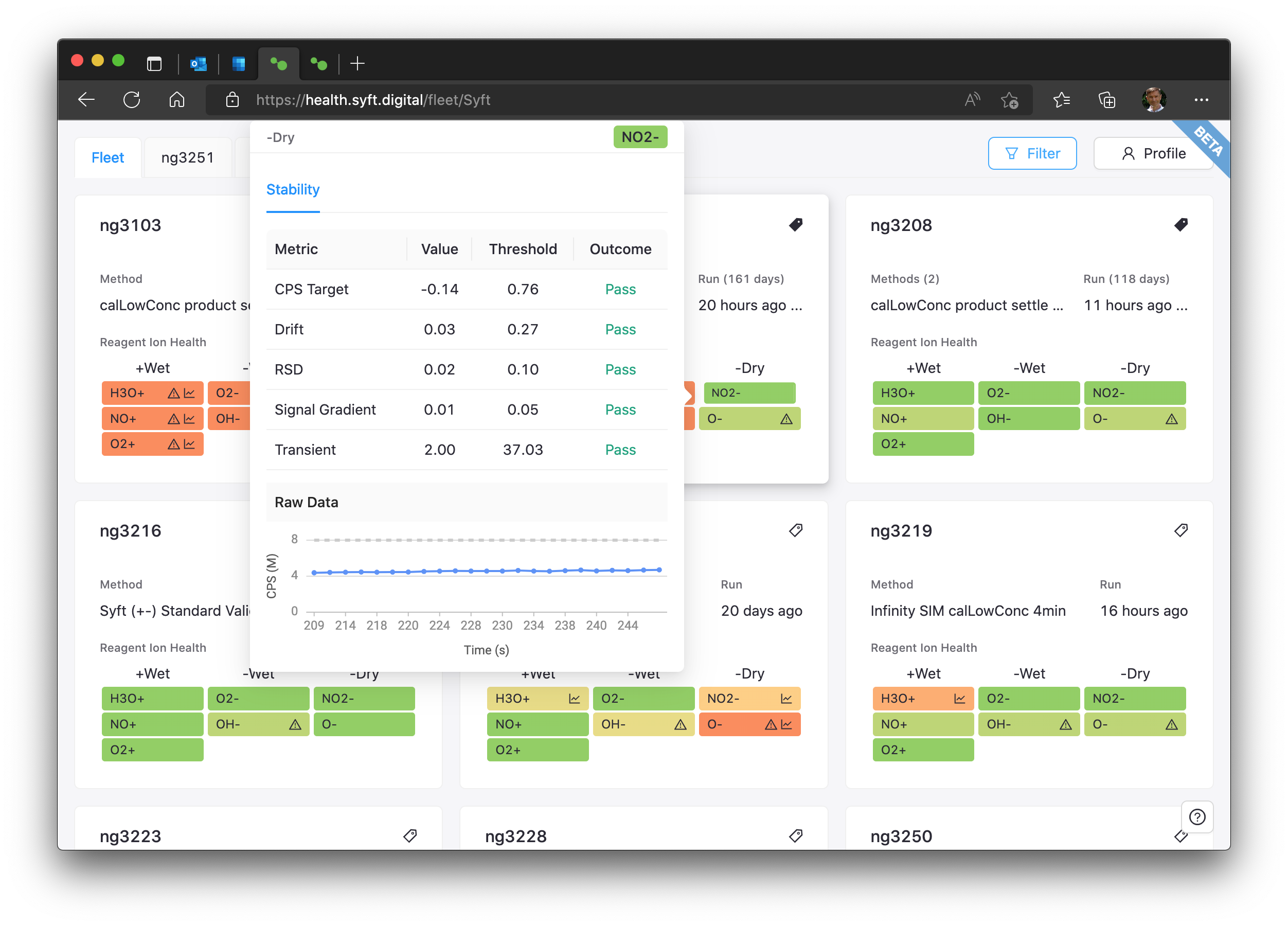
Instrument Quick View: Easily see more details for the reagent of a specific instrument from the fleet list view.
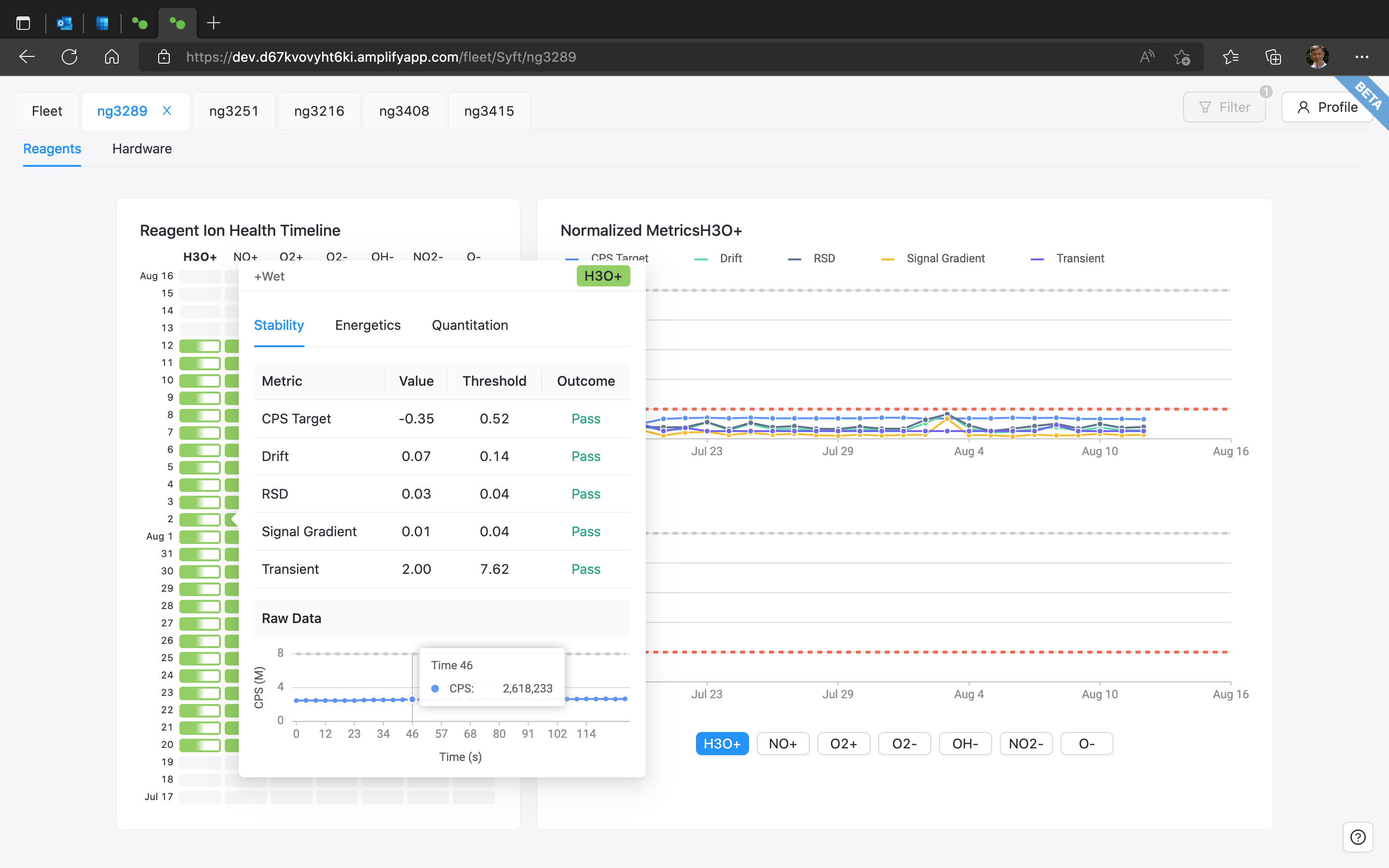
Instrument Details: Selecting an instrument from the fleet view opens a new instrument tab with performance timeline, detail for timeline segment, and hardware information.
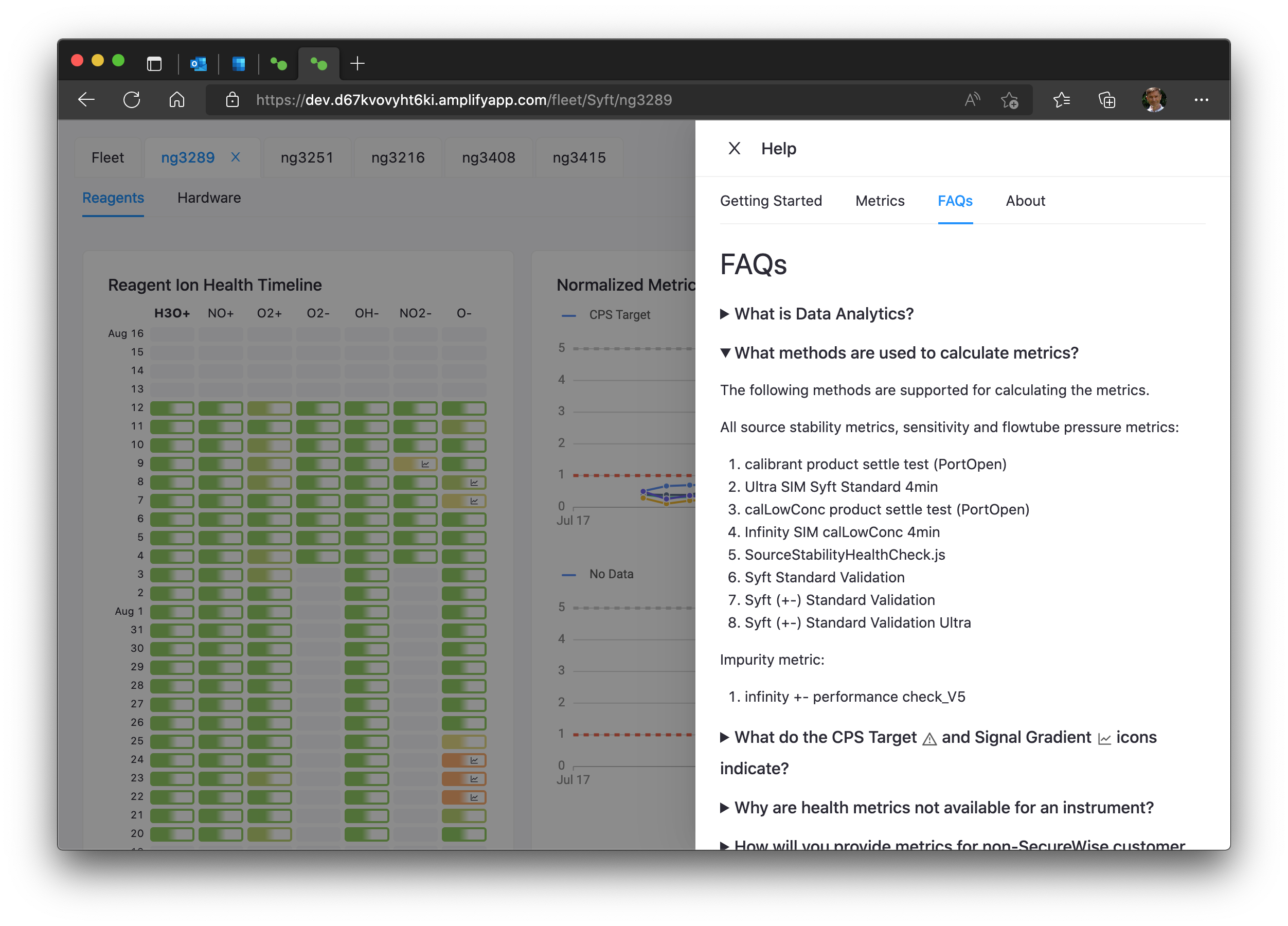
Help Panel: Help information easily updated and tailored for specific customers, fleets and types of instrument.
Mersen R-TOOLS: Complex Engineering Simulation UX
The Problem: Heat sink design required running expensive thermal simulations that took minutes. Engineers needed an interface that made complex thermal engineering accessible while handling long-running compute workloads without blocking the user.
What I Built: Design and simulation tool that made thermal engineering approachable. Visual layout tools for heat sources and cooling systems, with async simulation handling that didn't block user workflow.
Core Capabilities:
- Visual design interface for complex thermal layouts
- Async simulation execution (minutes-long compute)
- Heat sink recommendation engine based on thermal requirements
- Non-blocking UX that allows parallel design work
Stack: React, Recoil, AntD, AWS (Lambda, EC2 simulation servers)
R-TOOLS MAXX Air and Liquid Cooled Heat Sink Selector Tool
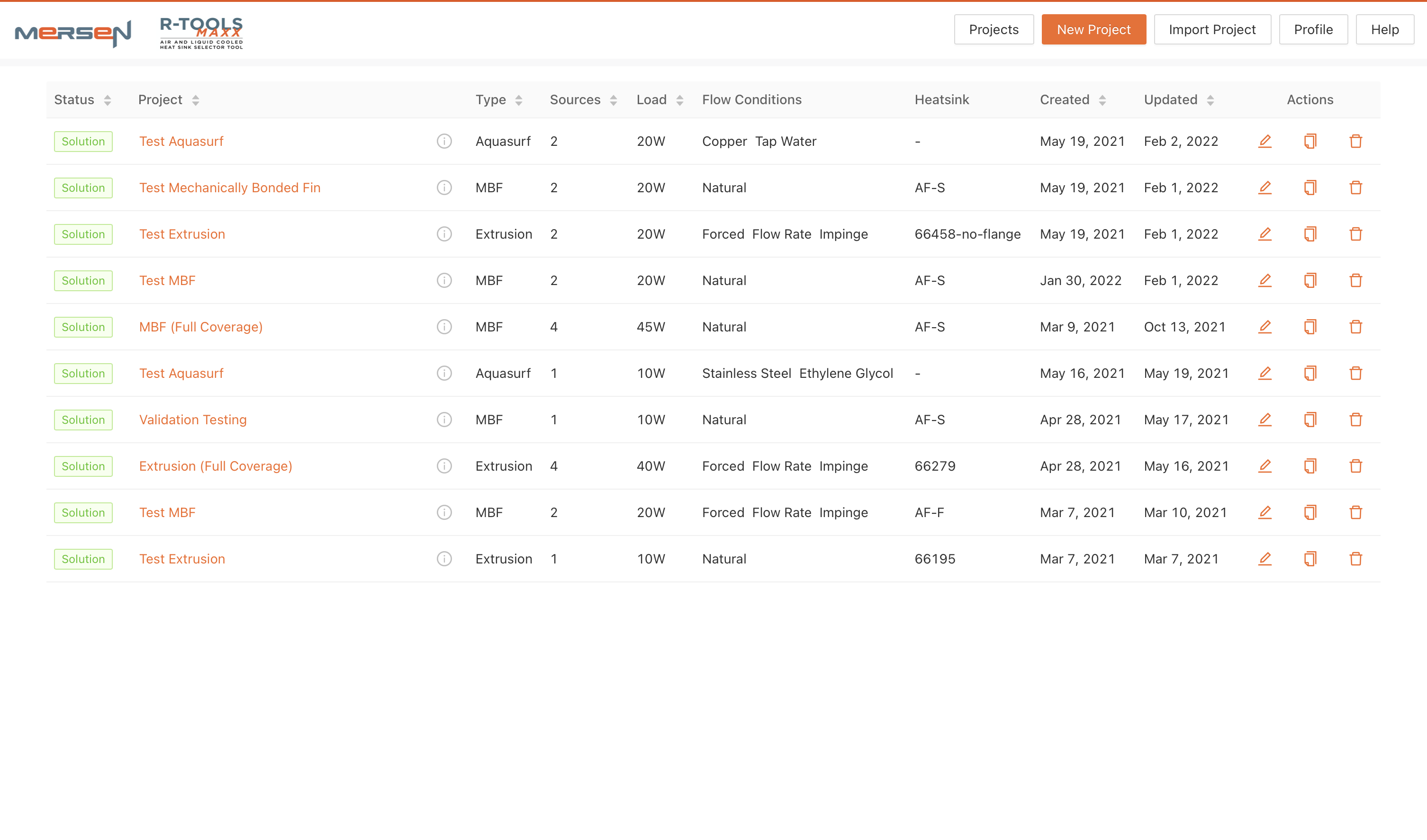
Projects List: List of all the user's designs and summary of key parameters
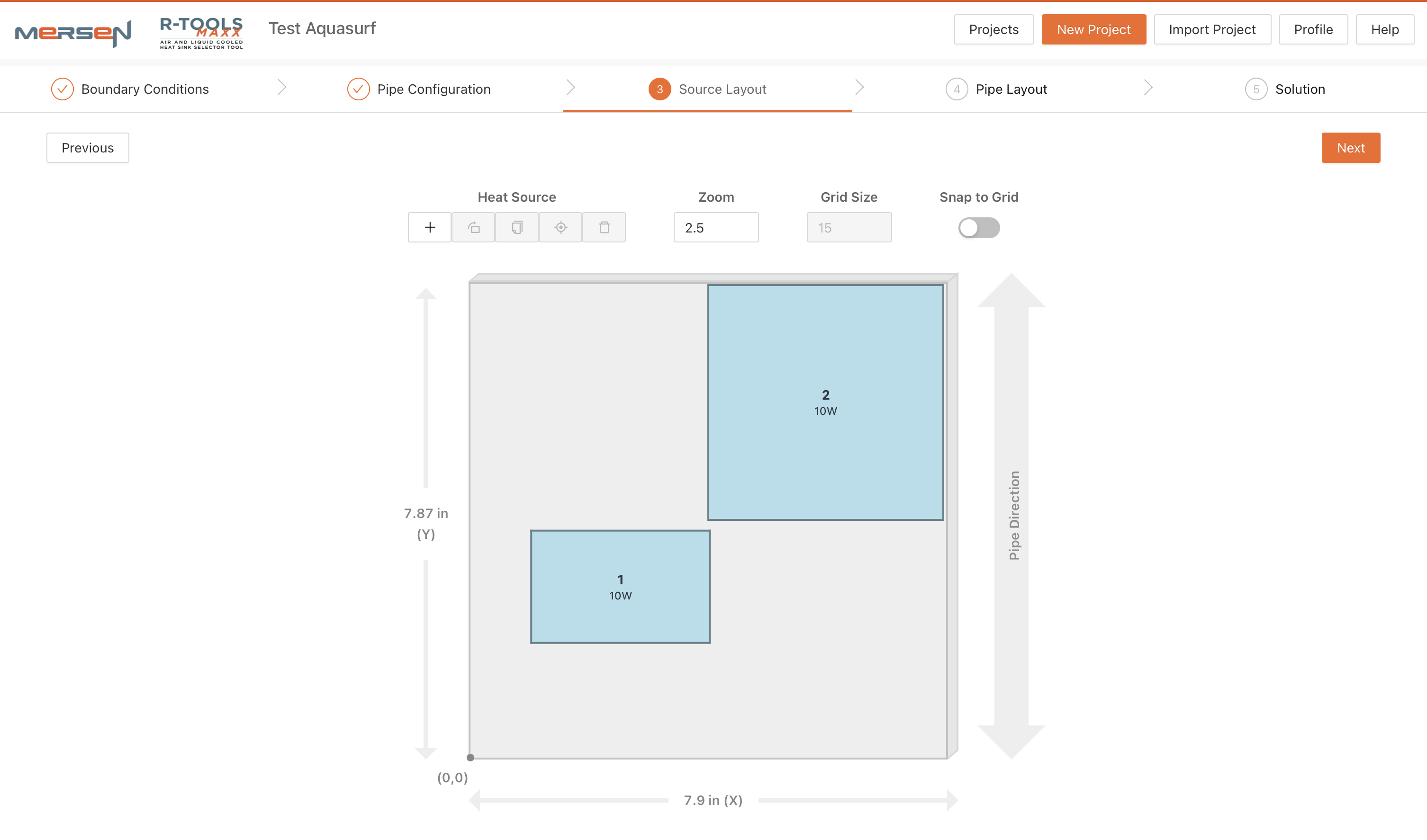
Heat Source Layout: Specify the size and parameters of heat sources, add and remove heat sources, drag to position.
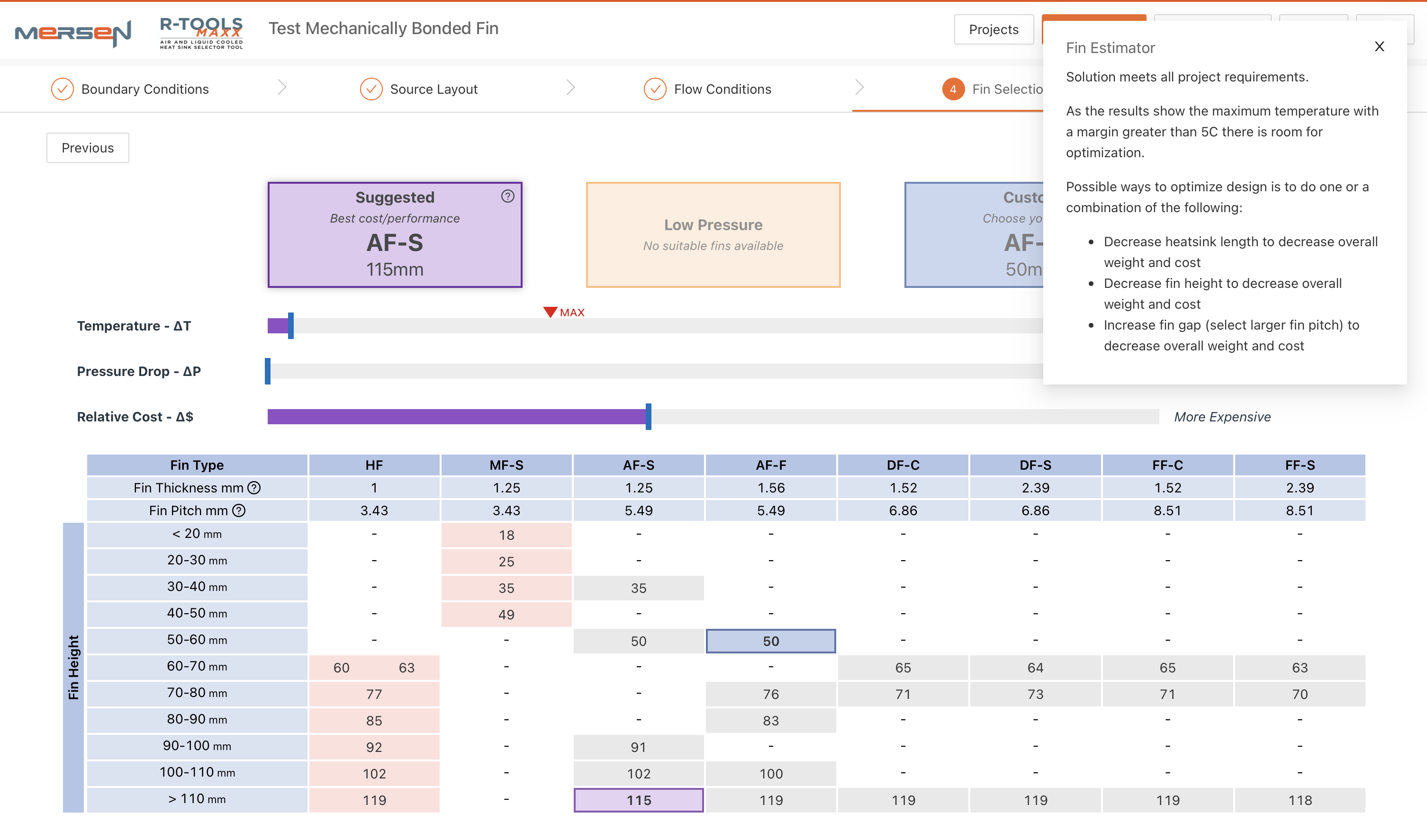
Mechanically Bonded Fin Selector: The fin selector recommends suitable heat sink extrusions from the specified heat sources and flow conditions.
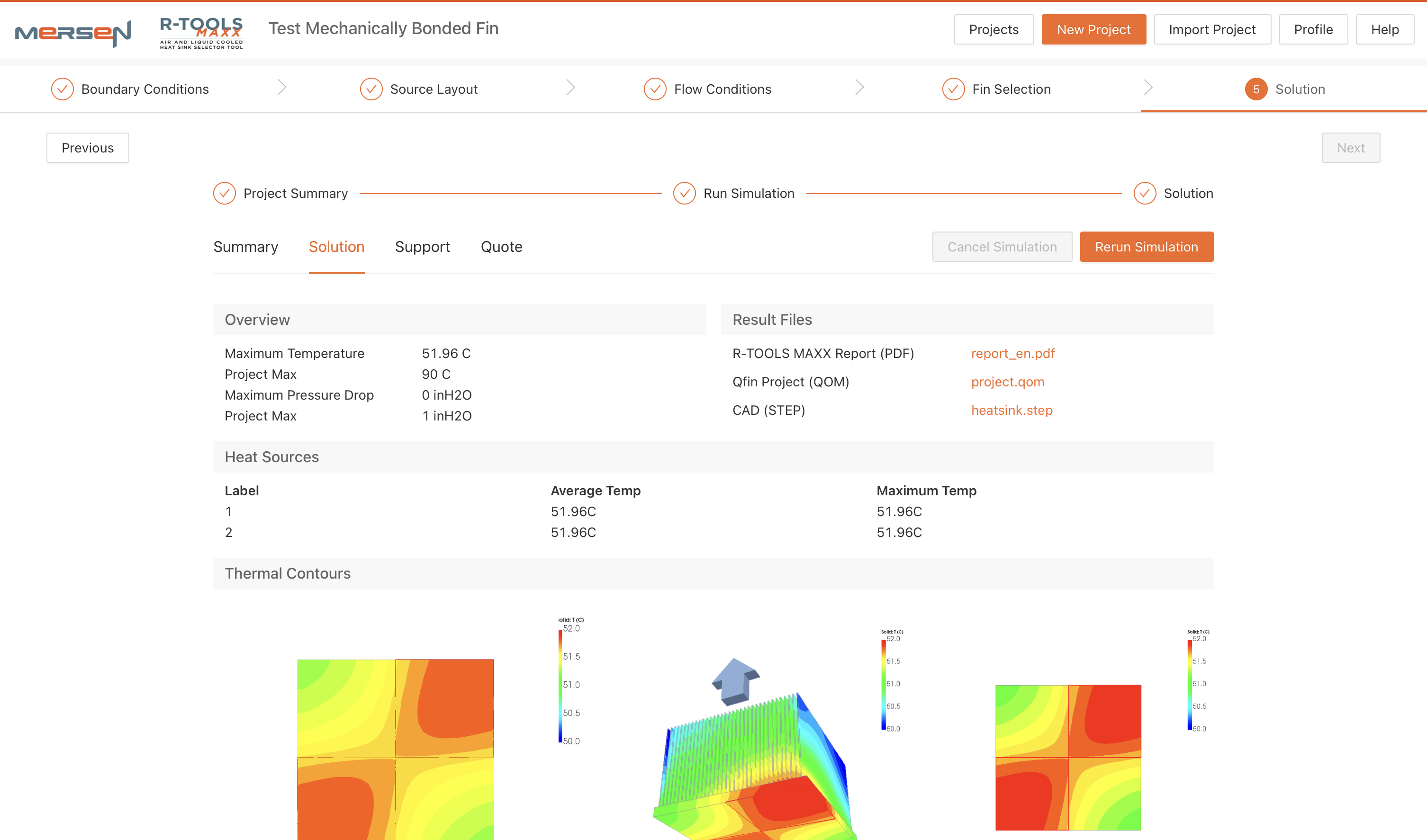
Mechanically Bonded Fin Thermal Simulation: Simulations run on separate EC2 servers and depending on the design complexity may take minutes to complete. Users can continue with other designs and come back to review the completed simulation.
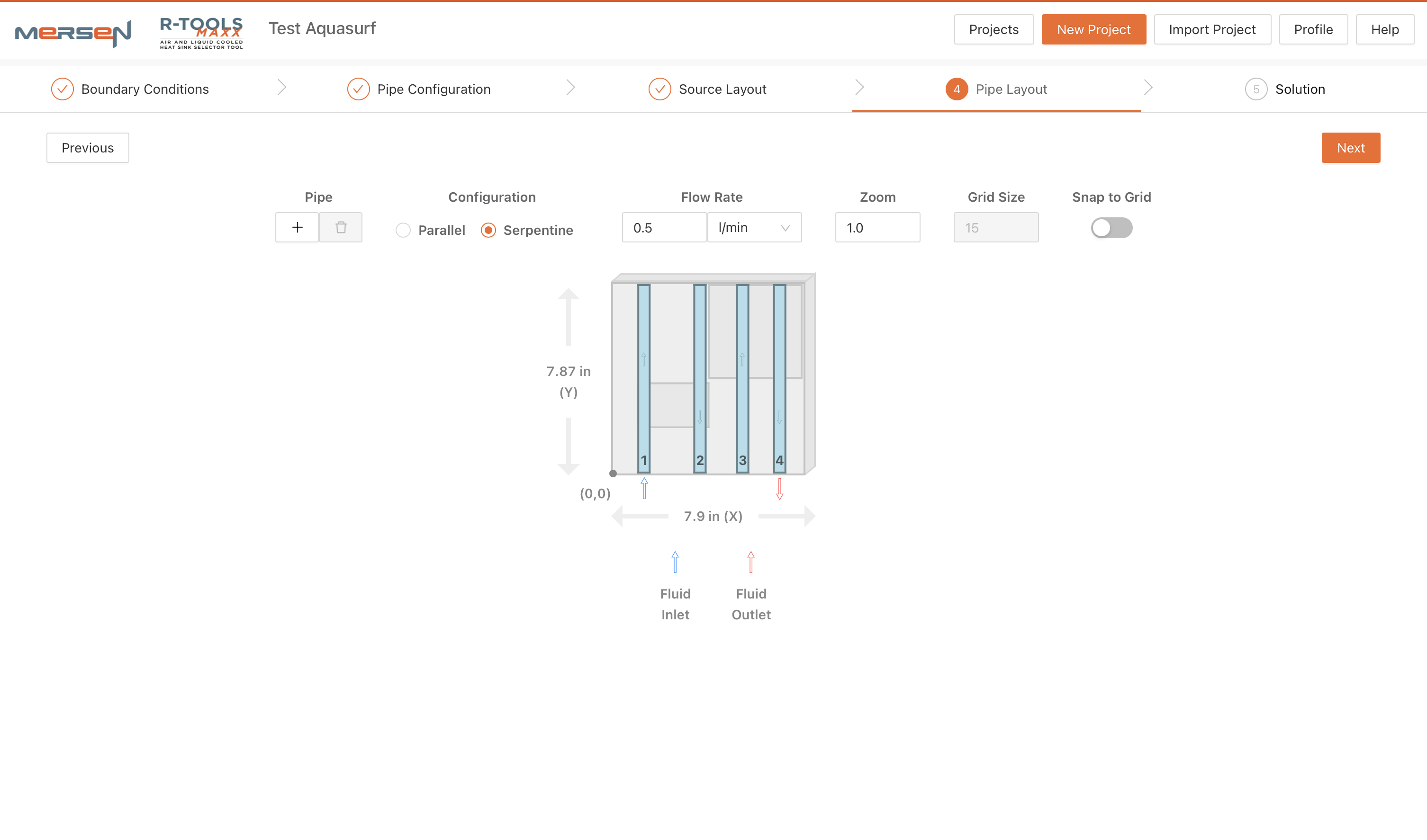
AquaFlow Pipe Layout: AquaFlow heatsinks have embedded coolant pipes in the heat sink base. Users can add and remove pipes, position them and set the flow direction.
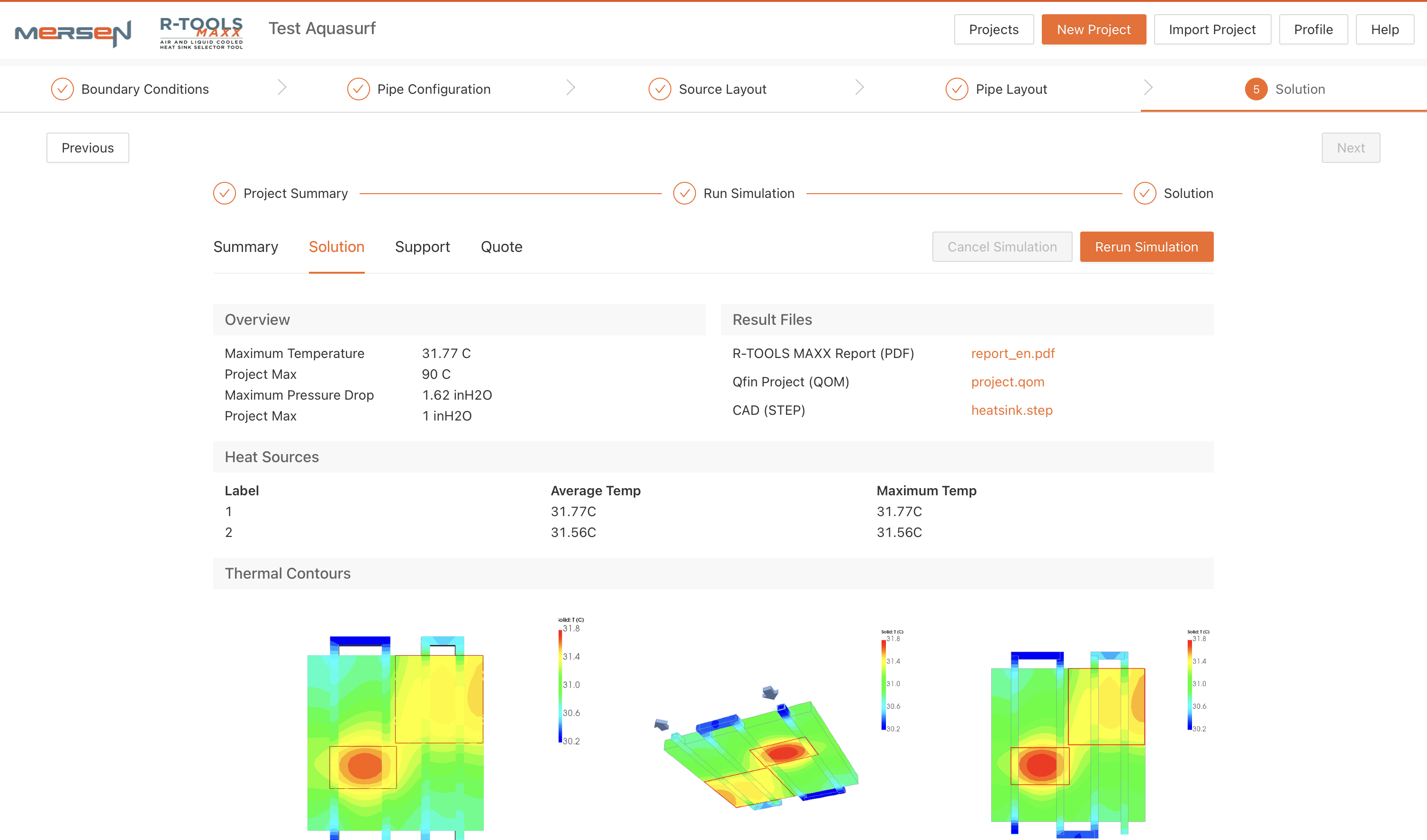
AquaFlow Thermal Simulation: Simulations run on separate EC2 servers and depending on the design complexity may take minutes to complete. Users can continue with other designs and come back to review the completed simulation.
Common Patterns
These projects share core characteristics:
- Complex systems made explorable through custom visualization
- Real-time or async data handled without blocking the user
- AI that is checked: deterministic checks, figures traced to their source, and evals around the model
- Technical depth in both frontend engineering and system architecture
- Bespoke solutions for problems off-the-shelf tools couldn't solve
Looking for someone to build something similar for your systems? Get in touch